Use Einstein and Personal Email Instructions to Draft a Sales Email
Use your own instructions with Einstein generative AI to draft your sales emails. Like
email templates, Einstein pulls in a contact’s name and information to customize your sales
email. But unlike a static template, Einstein creates unique, personalized output every
time.
Required Editions
Available in: Lightning Experience
Available with the Einstein for Sales add-on, which is available for an extra
cost in Performance and Unlimited Editions.
User Permissions
Needed
To send sales emails using Einstein generative AI:
Einstein Sales Emails permission set
To use this feature, ensure that Add Email Prompt Instructions is
enabled.
Create emails in Salesforce and in Salesforce email integrations for Outlook and
Gmail.
In Salesforce, open the email composer anywhere in Lightning Experience.
In Gmail or Outlook integrations, locate the Einstein Sales Emails component in
the email application pane.
Enter a recipient with a contact or lead record in Salesforce.
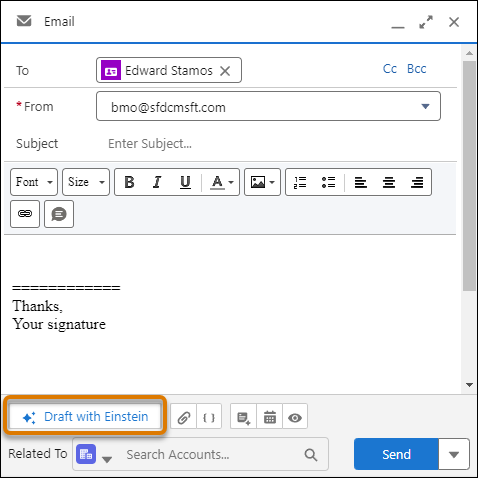
Click Draft with Einstein.
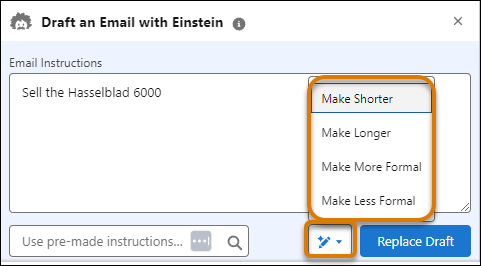
Enter instructions and click Draft Email. A proposed draft email
appears for you to review.
Revise the content or use it as-is to send an email.
Revise the draft by altering the email instructions, choosing from pre-made
instructions, or selecting from the adjustment choices.
Each time you choose a revision, you get a personalized response.
Important This tool uses generative AI, which is known
to include inaccurate or harmful responses. Before sharing externally, review the output for
accuracy and safety. You assume responsibility for the output when sharing.
Did this article solve your issue?
Let us know so we can improve!
Loading
Salesforce Help | Article
Cookie Consent Manager
General Information
Required Cookies
Functional Cookies
Advertising Cookies
General Information
We use three kinds of cookies on our websites: required, functional, and advertising. You can choose whether functional and advertising cookies apply. Click on the different cookie categories to find out more about each category and to change the default settings.
Privacy Statement
Required Cookies
Always Active
Required cookies are necessary for basic website functionality. Some examples include: session cookies needed to transmit the website, authentication cookies, and security cookies.
Functional Cookies
Functional cookies enhance functions, performance, and services on the website. Some examples include: cookies used to analyze site traffic, cookies used for market research, and cookies used to display advertising that is not directed to a particular individual.
Advertising Cookies
Advertising cookies track activity across websites in order to understand a viewer’s interests, and direct them specific marketing. Some examples include: cookies used for remarketing, or interest-based advertising.