
Sandbox Support for Enablement
Enablement Lite, full Enablement, and Partner Enablement functionality is available in sandboxes with some limitations.
Required Editions
| Available in: Lightning Experience |
| Enablement is available in Developer Edition with a limited number of add-ons. It is also available with Sales, Service, or the Salesforce Platform in: Enterprise, Performance, Unlimited, and Einstein 1 Sales Edition Editions for an additional cost |
| Enablement Lite is available with Sales in: Enterprise, Performance, and Unlimited Editions |
| Partner Enablement is available in Developer Edition with a limited number of add-ons. It is also available with Sales, Service, or the Salesforce Platform in: Enterprise, Performance, and Unlimited Editions for an additional cost. A supported PRM add-on license is required. |
Migrating Enablement Data from a Sandbox to Production
Use a sandbox to test Enablement programs, measures, and other capabilities before you create records in production. When you’re ready, migrate Enablement programs and measures from a sandbox to production with Metadata API for change sets and Salesforce CLI. See Deploy Enablement Programs and Measures from a Sandbox to Production.
Enablement Workspace in Digital Experiences
An Enablement workspace and a CMS channel are required for managing content in program exercises. The type of sandbox you’re using determines if any additional setup is needed to make your sandbox ready for Enablement programs.
In a Full sandbox, the Enablement workspace is available by default. To create a CMS channel, scroll to the Prepare Your Sandbox for Enablement section on the Enablement Settings page and click Configure Channel.
In a Developer, Developer Pro, or Partial Copy sandbox, the Enablement workspace and CMS channel aren’t available by default. To create a workspace and channel, click Configure Workspace and Channel on Enablement Settings page.
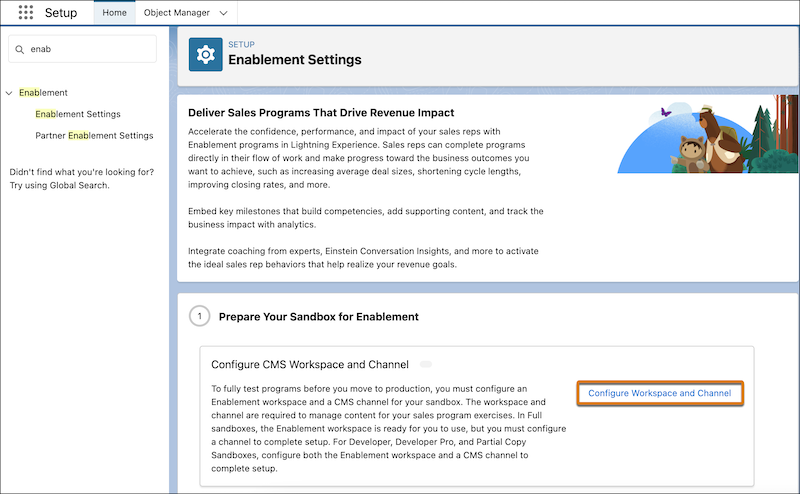
This option is available only one time per sandbox.
Guidance Center
For sales programs in Lightning Experience, Salesforce admins must enable Guidance Center in sandboxes before Enablement users can take programs. To do so, Salesforce admins must turn on Adoption Assistance in Sandbox Orgs in the In-App Guidance settings.
In-App Guidance for Enablement Admins
In a sandbox, Enablement admins have limited access to the notifications and resources that they have in production.
- Enablement admins don’t receive an email or in-app notification after being assigned
either of these permissions, depending on the type of program you’re creating.
- Design and Deliver Enablement Lite Programs
- Design and Deliver Enablement Programs
- Enablement admins can’t access the “Build, Launch, and Track Programs” guidance set, even when the Guidance Center is enabled for sandboxes.
- Enablement admins can’t access the walkthrough that appears the first time they visit Program Builder.
Trailhead Availability
When creating Enablement Lite or full Enablement programs from sandboxes, Enablement admins can’t add Trailhead modules to Trailhead exercises.
Programs that are created in production and copied to sandboxes can include Trailhead exercises with links to modules. But Enablement users can’t view or take those programs from the Guidance Center in a sandbox. Instead, users see an error that the program isn’t available and are told to contact the person who assigned them the program.
Partner Enablement programs don’t support Trailhead exercises in production or sandboxes.
Programs That Use Einstein Conversation Insights
To test sales programs that reference Einstein Conversation Insights (ECI) in a sandbox, some extra steps are required to turn on ECI first.

