You are here:
Managing Common Pipeline Forecast Types
Forecasts types specify how Salesforce calculates forecasts and projects sales from a different perspective. Learn about managing these common pipeline forecast types.
Required Editions
| Available in: both Salesforce Classic and Lightning Experience |
| Available in: Professional (no opportunity splits forecasts), Performance, and Developer Editions and in Enterprise and Unlimited Editions with Sales |
- Monthly and Quarterly Pipeline Forecasts
In the Forecasts page, the summary shows forecasts for individual months or quarters and a range of months or quarters, depending on the settings your Salesforce admin defines. Your admin can also enable custom periods. - Revenue and Quantity Pipeline Forecasts
Calculate forecasts on revenue or quantity. - Custom Measure Pipeline Forecasts
Project sales to best reflect how you do business, using a custom currency or custom number field as the measure in a forecast type. - Overlay Splits Forecasts
Track revenue from sales team members who help close opportunities but aren’t directly responsible for them.
See Also
Monthly and Quarterly Pipeline Forecasts
In the Forecasts page, the summary shows forecasts for individual months or quarters and a range of months or quarters, depending on the settings your Salesforce admin defines. Your admin can also enable custom periods.
Depending on your settings your admin defined, you can forecast up to 15 months, 15 fiscal periods, or 8 quarters in the future or past. If your forecast range includes the current month, period, or quarter, the forecasts page shows the current month, period, or quarter. Otherwise, the first month, period, or quarter of the range is selected. Regardless of whether your company uses monthly or quarterly forecasts, forecast managers can use quotas and adjust their subordinates’ forecasts. Quota and adjustment periods are based on the period settings.
The forecast date range becomes the default for all forecast users. Users can keep this default or select a different date range for their own forecasts. After users change their individual forecast date range, admins can’t override them. However, when an admin changes the period display from monthly to quarterly or quarterly to monthly, the change is reflected in all users’ forecasts.
Revenue and Quantity Pipeline Forecasts
Calculate forecasts on revenue or quantity.
For example:
- A sales manager wants to forecast using revenue because the sales vice president sets quota amounts based on the U.S. dollar.
- A sales rep wants to forecast using quantity because of an incentive to sell 10,000 units of a promotional product.
To forecast revenue and quantity for the same data source, such as the Opportunity object, your Salesforce admin can create a forecast type for each, and you can switch between them on the forecasts page.
For details about what data each forecast type is based on, see Pipeline Forecast Types.
Custom Measure Pipeline Forecasts
Project sales to best reflect how you do business, using a custom currency or custom number field as the measure in a forecast type.
Required Editions
| Available in: Lightning Experience in Performance and Unlimited Editions with Sales, and for an additional cost in Enterprise Edition |
A measure is used to calculate forecasts. Measures are based on number (quantity) or currency (revenue) fields from the object being that information is gathered from for a forecast. By default, and depending on the object you use, you can calculate forecasts based on revenue using the standard Amount, Revenue, or Total Price fields or by quantity using the Quantity field. Depending on the object you select for a forecast type, one or more of these fields are available to select as the measure for that type.
If you have a specific business model that requires the forecast calculations to happen using values from a custom currency or number field that you use to capture revenue or quantity. Depending on the object used for forecasts, this custom field is then available and selected as the measure in a forecast type.
Use these field types to define a custom field that is available as a custom measure in a forecast type.
- Currency: Use a custom currency field to forecast on revenue. For example, create a custom currency field to capture Monthly Recurring Revenue or Annual Contract Value to create forecasts on those values. A custom currency field as a custom measure is available if you base forecasts on Opportunity, Opportunity Product, Opportunity Split, or Line Item Schedule objects.
- Number: Use a custom number field to forecast on quantity. For example, create a custom number field to capture the number of Net New Subscriptions to create forecasts on those values. A custom number field as a custom measure is available if you base forecasts on the Opportunity, Opportunity Product, or Line Item Schedule objects.
When using a custom measure, be sure to select the field that you’re using as a measure as one of the fields available as a column in the opportunity list on the forecast page. If users don’t have access to the custom field used for the measure, they can still see the forecasts based on the measure. They can’t see the values for the custom field in the opportunity list.
Notes About Salesforce Classic
In Salesforce Classic, you can forecast on custom currency fields via an opportunity split, if the custom field is enabled for opportunity splits. The opportunity owner automatically receives a 100% split for the field. So, if your company doesn’t plan to use splits with the field, the rollup is the same as if no splits existed.
Overlay Splits Forecasts
Track revenue from sales team members who help close opportunities but aren’t directly responsible for them.
Required Editions
| Available in: both Salesforce Classic and Lightning Experience |
| Available in: Performance and Developer Editions and in Enterprise and Unlimited Editions with the Sales |
As a sales manager, use revenue splits for crediting team members who are directly responsible for opportunities. To provide more flexibility with how you assign credit for opportunities, you can use overlay splits. Overlay splits help you and other team members allocate credit to overlay sales roles for working on opportunities. Overlay splits can add up to any percentage of the opportunity amount, sometimes exceeding 100%. For example, your sales team can include sales engineers, product specialists, or partners who help close deals but aren’t directly responsible for them.
When you forecast on overlay splits, forecast amounts roll up through the role hierarchy based on the opportunity’s Amount field and the overlay team member’s split percentage.
Let’s say a sales rep, Allison, has an opportunity that includes an overlay split of 50% for sales engineer Owen, who’s working with Allison on the deal. For Allison, the opportunity Amount field rolls up into her opportunity revenue forecast.
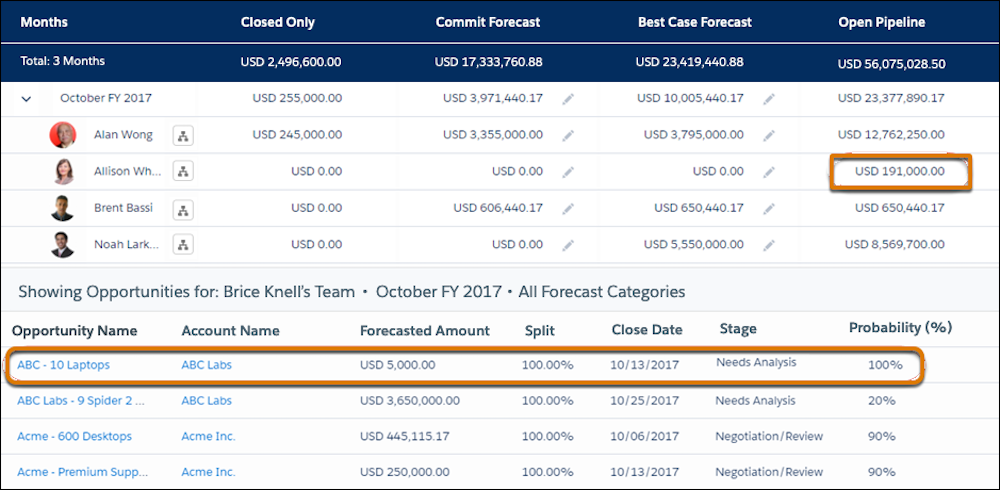
Allison’s manager Bryce can view the overlay forecast along with all the other opportunities that his sales engineer team is working on. Bryce can see that Allison is receiving a 100% credit for her deal, which contributes to Allison’s open pipeline total and Bryce’s open pipeline total. If Bryce thinks the deal could close for a higher amount, he can adjust the commit or best case forecast amount.