
You are here:
View Cadence Details
View cadence details on the record home page. View cadence steps in Cadence Builder.
Required Editions
| Available in: Lightning Experience |
| Available with Sales Engagement, which is included with Sales in Performance, Einstein 1, and Unlimited Editions, and available for an extra cost in Professional and Enterprise Editions. Sales Engagement is also available for an extra cost in Service and Lightning Platform. |
| User Permissions Needed | |
|---|---|
| To view cadences: | Sales Engagement User OR Sales Engagement User Included OR Sales Engagement Cadence Creator OR Sales Engagement Cadence Creator Included |
To view details like the state, creator, last modified date, and list of target buyers, click the cadence in a list view.
To view the cadence steps in the Cadence Builder, from the record detail page, click View Steps.
To edit the cadence steps in the Cadence Builder, from the record detail page, click Modify Steps.
To view a call script or email template that’s used in a cadence, click the script or template name.
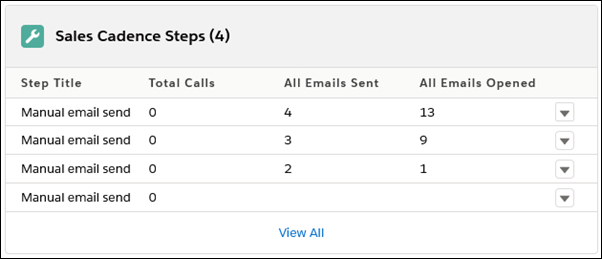
The Cadence Steps related list shows you how many times emails were opened for each email step.
To see the list of targets currently active in the cadence, view the Cadence Targets related list. Targets that have completed the cadence or have an error aren’t included in the list.
Use the Active Targets, Total Targets, Successful Completions, and Total Steps fields to see which cadences are used most by reps and which take the most targets through all the steps to completion. These fields are updated once per day.
