
You are here:
Sell Faster with Sales Engagement
Understand how the Lightning Sales Console, Work Queue, Sales Dialer, Quick Cadences, Automated Actions, and other Sales Engagement features work together to help accelerate your sales.
Required Editions
| Available in: Lightning Experience |
| Available with Sales Engagement, which is included with Sales in Performance, Einstein 1, and Unlimited Editions, and available for an extra cost in Professional and Enterprise Editions. Sales Engagement is also available for an extra cost in Service and Lightning Platform. |
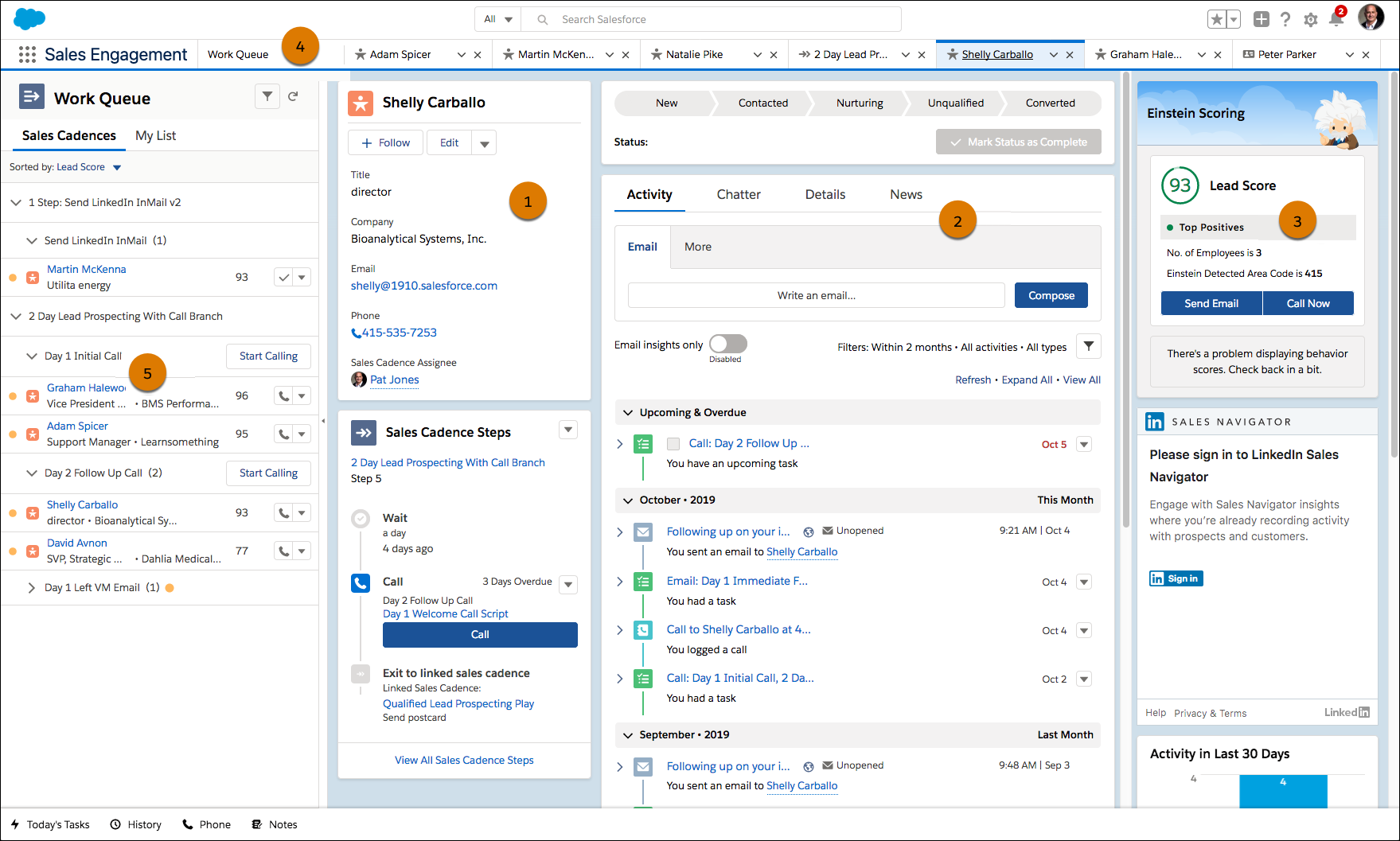
The console features a navigation-friendly, three-column layout that includes a highlights panel (1), the familiar workspace (2), and useful related lists (3). With the split view, your reps can see a list view while they view workspace tabs and subtabs, so they get everything they need in one workspace. You can customize the default layout for your company’s business processes.
Reps can pin tabs such as Home (4) for easy access to useful content. Home provides reps an overview of what’s waiting for them in the Work Queue. It can also be customized for users to show relevant reports and dashboards.
Your reps can get the most out of Sales Engagement with the Work Queue (5) in the split view. With the Work Queue, reps see a prioritized list of emails, calls, and tasks. The cadences that sales managers create define these activities. And reps can also tackle their own list of one-off activities from My List.
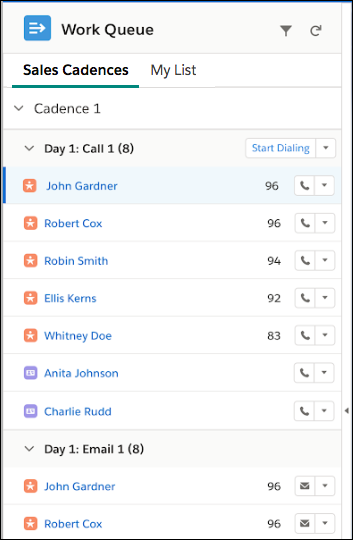
If your company uses Einstein Lead Scoring, leads in the Work Queue are prioritized by lead score. Your reps can immediately tackle the leads that are most likely to convert based on artificial intelligence about your business’s patterns of lead conversion. If Einstein Lead Scoring isn’t active, records are sorted alphabetically.
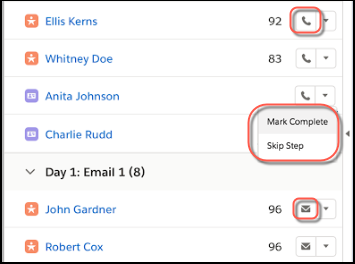
Reps can take action directly from the Work Queue. They can click the phone icon to open Sales Dialer from the console. Reps can send emails with the email action. And call scripts and email templates assigned to the cadence steps help reps power through each action even more efficiently. If reps perform the task without using the Work Queue, they can also manually complete a step. And they can skip a step if it isn’t relevant.

You can also expose the Work Queue in the Outlook and Gmail integrations by adding the component to an email integration pane.
Sales Engagement includes Einstein Activity Capture, so relevant events and emails are automatically associated with related records in Salesforce. The automatic association saves reps the step to manually logging different activities.
- Simplifying Outreach Tasks with Quick Cadences
With quick cadences, you can create personal communication templates to save time by easily adding your own outreach steps to your To Do List and Work Queue. Create quick cadences for calls, emails, LinkedIn InMail, and custom steps. Then assign leads, contacts, and person accounts to a quick cadence to take action later. - Prioritize Sales Outreach Based on Prospect Engagement
Find out immediately when cadence targets engage with emails. Engagement alerts for email opens, replies, bounces, and link clicks appear in the My Feed tab of the Work Queue. Alerts about record assignments are also included for Sales Engagement users.Engagement data also appears on target records and email messages.
