
You are here:
Contact Sync Filters
Lightning Sync contact sync filters let Salesforce admins limit which Salesforce contacts sync to users’ Microsoft or Google applications. Learn about how sync filters work differently, depending on how they’re set.
Salesforce admins can define these contact filters on users’ sync configuration data sets.
- Filter by record ownership
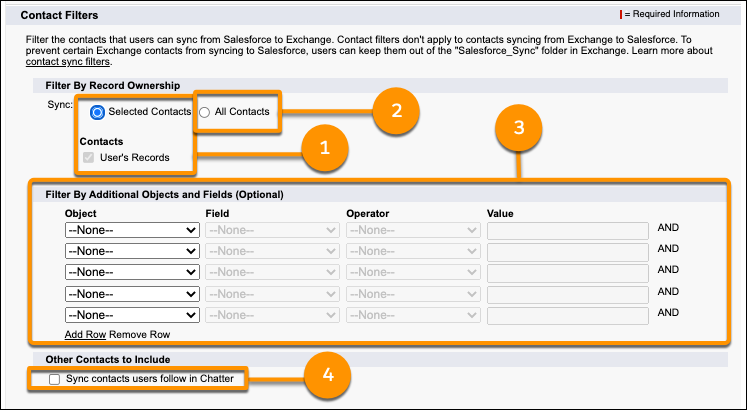
- Selected Contacts: User’s Records (1) - Select these options to sync only the contacts the user owns. You must select these options together.
- All Contacts (2) - Select this option to sync all contacts the user has access to in Salesforce. Remember, a users’ access to contacts is based on how you set up object-level and record-level security for contacts in your org.
- Filter by objects or fields (3)
- Sync contacts users follow in Chatter (4)
Sync Contacts Users Follow in Chatter Setting
The Sync contacts users follow in Chatter setting works differently depending on the other filters selected in the configuration.
| Selected record ownership setting | Additional object or field filters added? | User experience when the Sync contacts users follow in Chatter setting is selected |
|---|---|---|
| Selected Contacts: User’s Records | No additional filters added. | Only the Salesforce contacts that users own plus the contacts that users follow in Chatter sync to Salesforce. |
| Additional filters added. | Salesforce contacts that users own sync to Microsoft or Google, only if they meet the additional object or field filters. Plus Salesforce contacts that users follow in Chatter sync to Microsoft or Google, even if the contacts don’t meet the additional object or field filters. |
|
| All Contacts | No additional filters added. | All of the Salesforce contacts that users can access sync to Microsoft or Google, which includes contacts users follow in Chatter. Users see the same behavior whether the follow in Chatter setting is turned on or off. |
| Additional filters added. | Salesforce contacts that users can access, including the contacts that they follow in Chatter, sync to Microsoft or Google only if they meet the additional object or field filters. |
