
You are here:
Meeting Preparation and Follow-Up with Meeting Digest
Use the features in Meeting Digest, which is part of Salesforce Meetings, to prepare yourself and your teammates before a meeting or event. A little preparation helps to ensure that you’ve set the correct agenda and the right people are attending, which leads to more productive conversations.
Required Editions
| Available in: Lightning Experience |
| Available with Sales Cloud in: all editions |
 Make Every Conversation Count with
Salesforce Meetings (English Only)
Make Every Conversation Count with
Salesforce Meetings (English Only)
With Salesforce Meetings, you see the Meeting Digest tab on the event detail record. Use the features on the tab to prepare for the meeting.
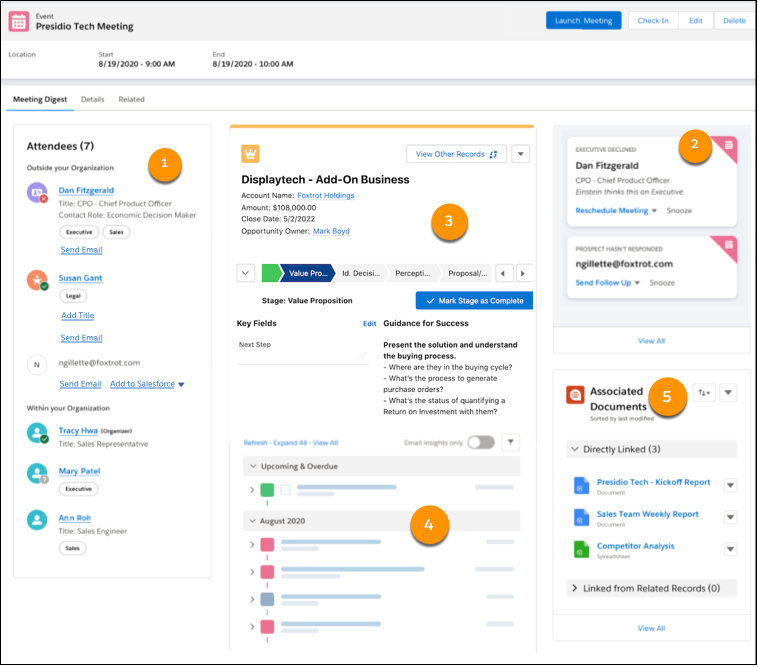
This screenshot shows Meeting Digest with Einstein Activity Capture enabled.
See Who’s Planning to Attend (1)
Use the attendee list to determine if the right stakeholders are invited to the meeting and plan to attend. For leads, contacts, and users in your organization, the attendee’s entry in the list includes details about their title and role if the Salesforce record includes those details. If your company uses Einstein Activity Capture to sync events, all Salesforce Meetings users see an enhanced attendee list for synced events. For each attendee, the list includes a job level and role indicator based on the attendee’s title. From the attendee list, you can determine who’s RSVP’d for the meeting. You can also add record information and create contact or lead records for attendees who don’t have a matching Salesforce record.
Get Quick Updates and Recommendations About the Meeting (2)
If your company uses Einstein Activity Capture to sync events, the event organizer sees helpful notifications and recommended actions about synced events. For example, we remind you if attendees haven’t responded, and provide recommended actions such as to follow up or reschedule the meeting. We also alert you about high priority cases and outstanding requests so you can address those issues during your meeting. Check here 48 hours before the start of the meeting for insights about the event. Follow-up actions are shown for 7 days after the event.
After the event ends, the insights change to include helpful links to schedule follow-up meetings, send emails, and notify the people about pending requests.
Review Related Record Details (3)
See a compact view of the related record, including key fields set on the compact layout. If the related record's object has an active Path defined, you can access the Guidance for Success for each path stage. From the Meeting Digest, mark stages as complete or revert to a previous stage, and add next steps as your conversations take place.
Learn About Past Interactions (4)
Use the activity timeline to understand how you and other team members have engaged with the prospect or customer. For events synced using Einstein Activity Capture, before the meeting starts the timeline is filtered to only include emails associated with the attendees if:
- The meeting is in the future.
- There are 10 or fewer attendees.
- At least one attendee is outside your organization.

Associate Documents and Take Notes (5)
If your Salesforce admin has set up and connected Quip, you can review any documents in Quip associated with the event’s related records. Depending on your permissions, you can collaborate in existing documents and add new related documents.
- Meeting Digest Troubleshooting
If you run into problems with Meeting Digest, such as not seeing the Meeting Digest tab or discovering that the meeting information is out of date, review our troubleshooting information.
