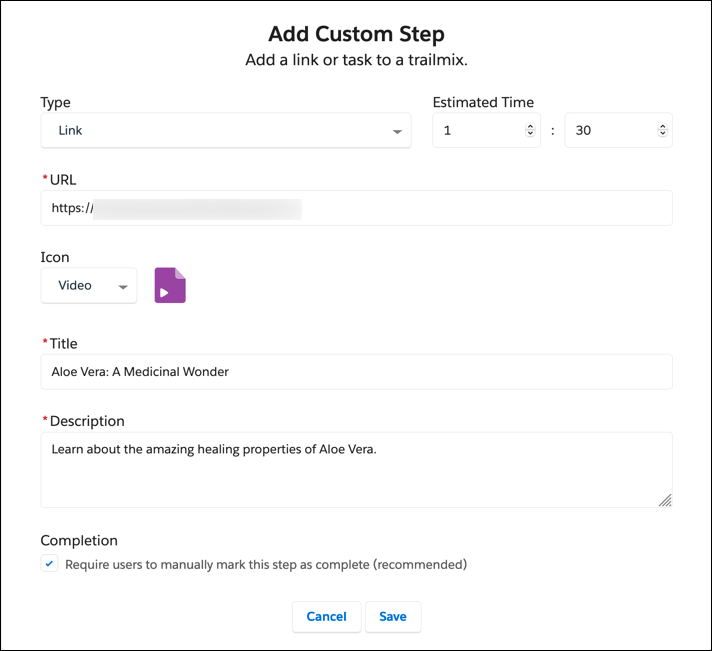
In a trailmix, you can include content from outside of your enablement site and
Trailhead. For example, you can include an activity that’s on the web, such as watching a video or
reading an article. Or you can add a task for the user to complete, such as talking to a
colleague.
Required Editions
Available in: Enterprise, Performance, and
Unlimited Editions
User Roles and Permissions
Enablement Site User Roles
This topic supports these enablement site roles:
Content Creators
Learners
Required System Permissions
To access content on your enablement site:
Permission to access at least one content collection
To create custom steps in a trailmix:
Manage Trailmix Custom Steps
Log in to your enablement site, and click Trailmixes.
On the Trailmixes index page, scroll to the Created by Me section, and click the trailmix
title.
Click Edit.
Click Add Content.
Select the kind of step that you want to add.
Link
A link to external content, such as a video or web page.
Task
An in-person activity, such as attending a seminar or talking to a colleague.
Enter other details for the step, such as the URL and an icon, and save.
After you create the step, you can drag it to another position in the trailmix.
Note As you modify the content in the trailmix, your changes are saved automatically.
We use three kinds of cookies on our websites: required, functional, and advertising. You can choose whether functional and advertising cookies apply. Click on the different cookie categories to find out more about each category and to change the default settings.
Privacy Statement
Required Cookies
Always Active
Required cookies are necessary for basic website functionality. Some examples include: session cookies needed to transmit the website, authentication cookies, and security cookies.
Functional Cookies
Functional cookies enhance functions, performance, and services on the website. Some examples include: cookies used to analyze site traffic, cookies used for market research, and cookies used to display advertising that is not directed to a particular individual.
Advertising Cookies
Advertising cookies track activity across websites in order to understand a viewer’s interests, and direct them specific marketing. Some examples include: cookies used for remarketing, or interest-based advertising.