
You are here:
Create a Trail in Trailmaker Content
You can create a trail and add modules from the Trailmaker Content workspace.
Required Editions
| Available in: Enterprise, Performance, and Unlimited Editions |
| User Roles and Permissions | |
|---|---|
| Enablement Site User Roles | |
| This topic supports these enablement site roles: | Content Creators |
| Required System Permissions | |
| To create and edit content with Trailmaker Content: | Create Content |
- In the Trailmaker Content workspace, click Add Content, and select New Trail.
-
Enter the trail’s details.
-
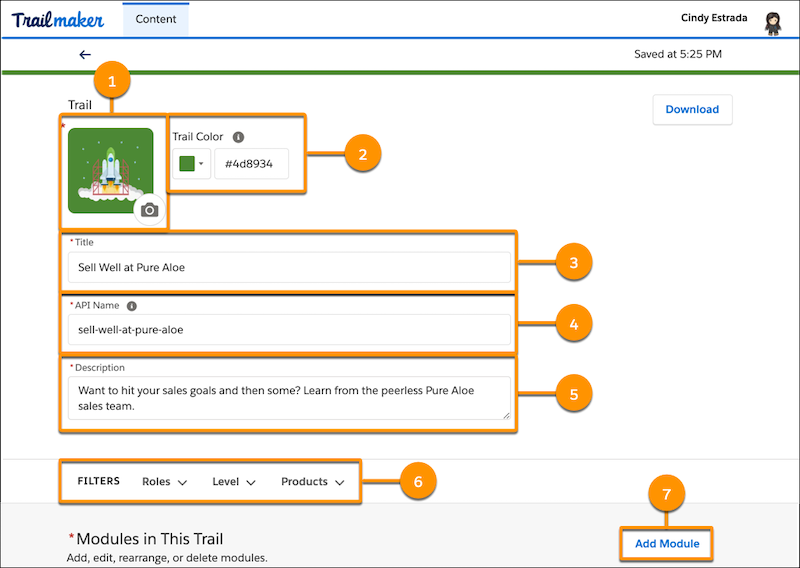
To add trail art, click the icon field (1). Upload an image file or enter a URL to an
image file on a content delivery network.
 Note Use a PNG file smaller than 10 MB. The ideal size for trail art is 200 ×200 pixels. See Guidelines for Images, Screenshots, Badge Art, and Trail Icons.
 -
To specify a custom color for the trail, select a color from the palette. Or, click the
dropdown, and use the Custom tab in the color picker window to specify a Hex code or RGB
values.
Note The color that you select applies to the trail header and the trail icon’s background. To make the icon stand out from the header, Trailmaker implements a color contrast that slightly darkens the header.
- Enter a trail title (3).
-
Accept the suggested API name (4), or enter a unique name that you want to use
instead.
Note
- A trail’s API name is used in URLs, so the API name is visible to learners.
- Each trail API name must be globally unique.
- Enter a brief description for the trail (5).
-
Select the trail’s applicable filters (6).
- One or more user roles for the trail’s target audience
- The experience level for the trail’s target audience
- The product tags that apply to the trail
-
To add trail art, click the icon field (1). Upload an image file or enter a URL to an
image file on a content delivery network.
-
To add a module to the trail, click Add Module (7). In the Add
Module to Trail window, select which option you want to use for adding the module.
- To create a module in Trailmaker Content, select Create a module. Complete the steps in Create a Module in Trailmaker Content.
- To add an existing module that’s already in your workspace, select Add a module from your workspace. Then, search for the module name to add, and click Done.
- To add a module by referencing its API name, select Add a module by API
name. Then, enter the exact API name for the module to add, and click
Done. Referencing by API name is useful for creating a trail that
references modules that don’t exist in the current writer’s workspace, such as:
- Modules that have already been published on your enablement site.
- Modules that you plan to create and add in the same release as the trail.
- Modules that other writers create in their own workspaces and add to the same release.
 Tip
Tip- If you specify a module that's already published on your enablement site, the module appears in the trail after you publish.
- If you specify a module that hasn't been published on your enablement site, make sure that you add the module and the trail to the same release before you publish.
If you’re collaborating with other content creators on the trail before you’re ready to publish it, download the trail’s backpack, and submit it to your company’s version control system. Then, delete the trail from your local workspace. When your collaborator is finished, you can import the most recent version of the trail’s backpack.
Note To preview a trail, launch the full release preview from the Trailmaker Release
app. The Trailmaker Content preview is compatible only with modules.
If you’re ready, a user with the Manage Releases permission can add the trail to an unpublished release.
See Also
- Considerations for Managing Content in Trailmaker Content
- Create Content Quickly with Content Templates
- Create a Module in Trailmaker Content
- API Names for Trails, Modules, and Units
- Metadata for Trails, Modules, and Units
- Guidelines for Images, Screenshots, Badge Art, and Trail Icons
- Import a Backpack into Trailmaker Content
- Add Content to a Release from Trailmaker Content
- Preview a Release in Trailmaker Release
Did this article solve your issue?
Let us know so we can improve!
