
You are here:
Automatic Account Assignments for Synced Contacts in Salesforce for Outlook (Retiring)
After syncing contacts from Outlook, Salesforce for Outlook tries to automatically assign them to accounts.
Required Editions
| Available in: Salesforce Classic |
| Available in: Lightning Experience, if Salesforce Classic is available in your org. |
| Available with the purchase of Sales Cloud or Government Cloud in: Personal, Contact Manager, Professional, Enterprise, Performance, Unlimited, and Developer Editions |
| User Permissions Needed | |
|---|---|
| To assign accounts: | Read on accounts and Edit on contacts |
| To create new accounts: | Create on accounts and Edit on contacts AND Show Quick Create |

Important Full product retirement for Salesforce for
Outlook is scheduled for December 2027. See Salesforce for Outlook Retirement. To keep
integrating Microsoft Outlook with Salesforce, check out our next-generation products: the
Outlook integration and Einstein Activity Capture. See Move from
Salesforce for Outlook (Retiring) to the Next-Generation Products.
After syncing contacts from Outlook, Salesforce for Outlook tries to automatically assign them to accounts, as shown in this diagram.
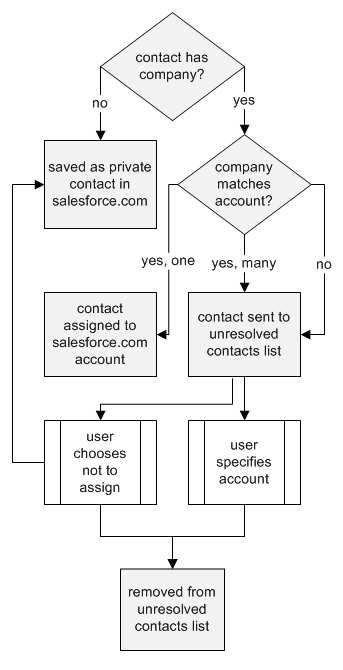
This table describes the account assignment process.
Did this article solve your issue?
Let us know so we can improve!
