
You are here:
Create Task Filters for Salesforce for Outlook (Retiring)
Specify which tasks sync between Microsoft® Outlook® and Salesforce for your sales teams.
Required Editions
| Available in: Salesforce Classic |
| Available in: Lightning Experience, if Salesforce Classic is available in your org. |
| Available with the purchase of Sales Cloud or Government Cloud in: Personal, Contact Manager, Professional, Enterprise, Performance, Unlimited, and Developer Editions |

Important Full product retirement for Salesforce for
Outlook is scheduled for December 2027. See Salesforce for Outlook Retirement. To keep
integrating Microsoft Outlook with Salesforce, check out our next-generation products: the
Outlook integration and Einstein Activity Capture. See Move from
Salesforce for Outlook (Retiring) to the Next-Generation Products.
Datasets consist of filters that limit what records sync. For example, most users sync past-due tasks, while other users sync only current and future tasks. Salesforce for Outlook syncs tasks based on their due dates rather than their start dates. For example, if you're syncing current and future tasks only, a task that started yesterday still syncs.
The Data Sets section of the Outlook Configuration detail page shows a summary of the configuration's current task filters.

Note Salesforce for Outlook doesn't sync every kind of task. These kinds of
tasks never sync:
- Recurring Outlook tasks to Salesforce
- Completed tasks, if marked as completed before Salesforce for Outlook syncs
- Emails or contacts added to your to-do list when you flag items for follow-up (because Outlook doesn't consider these items to be tasks)
- Define a data set for a configuration.
-
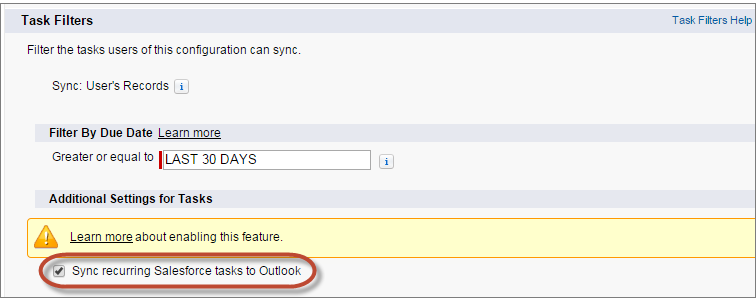
Under Tasks, enter one of these filters in the Greater or equal to
field.
- TODAY—Syncs tasks that are due on or after today. The start time is 12:00 a.m.
- LAST MONTH—Syncs tasks that were due on or after the first day of last month.
- LAST N DAYS—Syncs tasks that were due on or after a specified number of days ago, such as LAST 30 DAYS.
-
Choose whether recurring Salesforce tasks sync to Outlook.
- You can use the Get Record Count button to check how many records sync for a sample Salesforce for Outlook user based on the configuration's filters.
- Save the dataset.
Did this article solve your issue?
Let us know so we can improve!
