Create Identity Resolution Rules for Prospecting Center
Identity Resolution uses matching and reconciliation rules to link data from multiple
sources about people or accounts into unified profiles for segmentation, insights, and reporting.
In Prospecting Center, Identity Resolutions unify data that’s coming in from Data 360 into the
Prospecting Center, so your Sales reps don’t waste their time evaluating duplicate
records.
Required Editions
Available in: Lightning Experience
Available with Sales Engagement, which is included with Sales in
Performance, Unlimited Editions, Agentforce 1 Edition, and
available for an extra cost in Professional and Enterprise Editions.
Sales Engagement is also available for an extra cost in Service and Lightning
Platform.
Important Prospecting Center is scheduled for retirement in all Salesforce orgs
as of April, 2026. For existing customers, Prospecting Center remains available till April
2027.
User Permissions Needed
To create identity resolution rulesets:
Data Cloud Admin OR
Data Cloud for Marketing Admin OR
Data Cloud for Marketing Data Aware Specialist
In the Salesforce Data Cloud app, click the Identity Resolution tab.
Click New.
For Data Space, select Default.
For Primary Data Model Object, select Individual,
Account, or Leads. Click
Next.
Enter a name for the rule. Click Save.
On the new Identity Resolution object home, under Ruleset Properties, click
Configure next to Match Rules.
To unify profiles coming from different data sources, click Add Match
Rule. Select the default match rule, for example, Fuzzy Name and Normalized
Email.
Click Next | Next | Save.
Click Run Ruleset for Data 360 to build the unified profiles
records. This process can take a few minutes. An entity can have up to two published rulesets
in a data space.
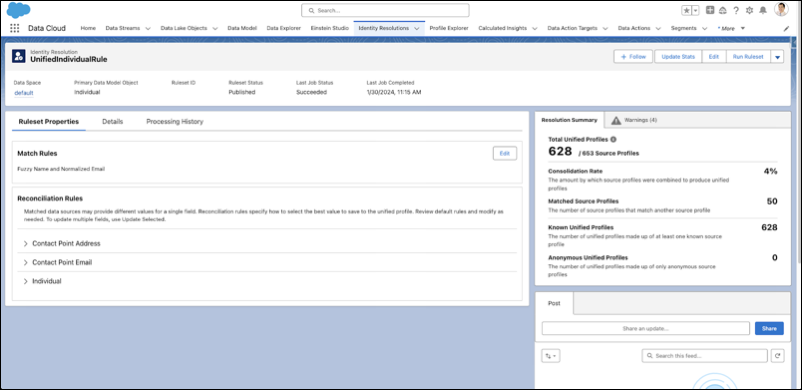
After you complete this step, your Identity Resolution ruleset mirrors this image. You
see a Resolution Summary on the right-side panel denoting the total number of unified individual
profiles created, based on your match and reconciliation rules.
Did this article solve your issue?
Let us know so we can improve!
Loading
Salesforce Help | Article
Cookie Consent Manager
General Information
Required Cookies
Functional Cookies
Advertising Cookies
General Information
We use three kinds of cookies on our websites: required, functional, and advertising. You can choose whether functional and advertising cookies apply. Click on the different cookie categories to find out more about each category and to change the default settings.
Privacy Statement
Required Cookies
Always Active
Required cookies are necessary for basic website functionality. Some examples include: session cookies needed to transmit the website, authentication cookies, and security cookies.
Functional Cookies
Functional cookies enhance functions, performance, and services on the website. Some examples include: cookies used to analyze site traffic, cookies used for market research, and cookies used to display advertising that is not directed to a particular individual.
Advertising Cookies
Advertising cookies track activity across websites in order to understand a viewer’s interests, and direct them specific marketing. Some examples include: cookies used for remarketing, or interest-based advertising.