
You are here:
Revenue Insights Assets
When you set up Revenue Insights, specific assets are included. To modify dashboards, you can modify these assets. It’s a good idea to understand the datasets and recipes that are used to populate your dashboards.
Required Editions
| Available in: Lightning Experience |
| Available with Sales and Government Cloud Plus for an additional cost in: Enterprise, Performance, and Unlimited Editions |
Resources
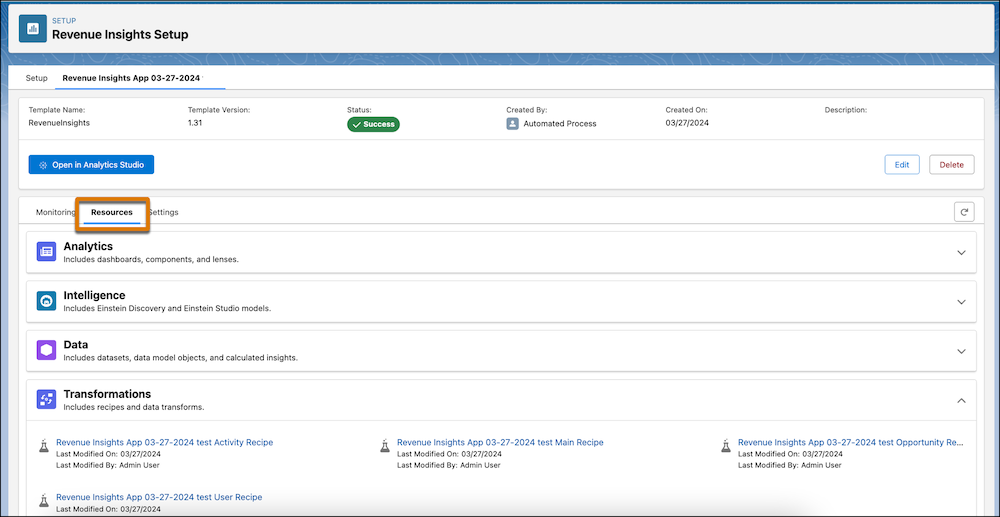
The app assets are listed under Resources on the Setup page for your app after successful installation. These include Einstein Studio models and CRM Analytics dashboards, components, recipes, and datasets. When you select an asset, it opens in its respective tool for detailed inspection.
Datasets
Revenue Insights creates the following datasets.
| Dataset Name | Contents | Source | Used by | Security Predicate | Special Requirements |
|---|---|---|---|---|---|
| Activity | Data about events and tasks. | Salesforce object -> Recipe | All dashboards | Owner.Roles.Roles' == "$User.UserRoleId" || 'OwnerId' == "$User.Id" || 'Opp.Account.OwnerId' == "$User.Id" || 'Opp.OwnerId' == "$User.Id" | None. |
| Account | Data about accounts. Includes accounts without opportunities. | Salesforce object -> Recipe | Not referenced in dashboards | 'Owner.Roles.Roles' == "$User.UserRoleId" || 'OwnerId' == "$User.Id" | None. |
| Forecast | Data about forecasts and forecast adjustments. | Salesforce object -> Recipe | All dashboards | 'User.Roles.Roles' == "$User.UserRoleId" || 'User.Id' == "$User.Id" | Forecasting must be enabled to generate this dataset. |
| Forecasting Quota | Data about forecasting quotas. | Salesforce object -> Recipe | All dashboards | 'Quota.Roles.Roles' == "$User.UserRoleId" || 'Quota.Id' == "$User.Id" | Forecasting must be enabled to generate this dataset. |
| Opportunity | Data about accounts, opportunities, and users. | Salesforce object -> Recipe | Not referenced in dashboards | 'Owner.Roles.Roles' == "$User.UserRoleId" || 'OwnerId' == "$User.Id" || 'Account.OwnerId' == "$User.Id" | None. |
| Opportunity Splits | Data about Opportunities broken out by split percentage by owner. | Salesforce object -> Recipe | All dashboards | 'Opportunity.Owner.Roles.Roles' == "$User.UserRoleId" || 'Opportunity.OwnerId' == "$User.Id" || 'Opportunity.Account.OwnerId' == "$User.Id" | None. |
| OpportunityHistory | Data about historical information for opportunities. | Salesforce object -> Recipe | All dashboards | 'Opp.Owner.Roles.Roles' == "$User.UserRoleId" || 'Opp.OwnerId' == "$User.Id" || 'Opp.Account.OwnerId' == "$User.Id" | None. |
| Opportunity RevInsights | Opportunity data with calculated fields and joins used in the Revenue Insights app. | Salesforce object -> Recipe | All dashboards | 'Owner.Roles.Roles' == "$User.UserRoleId" || 'OwnerId' == "$User.Id" || 'Account.OwnerId' == "$User.Id" | None. |
| OpptyProduct | Data about products with opportunities and accounts. | Salesforce object -> Recipe | All dashboards | 'Opportunity.Owner.Roles.Roles' == "$User.UserRoleId" || 'Opportunity.OwnerId' == "$User.Id" || 'Opportunity.Account.OwnerId' == "$User.Id" | None. |
| Product | List of all products. | Salesforce object -> Recipe | Not referenced in dashboards | None. | None. |
| Territory 2 | Data about territory forecasts and forecast adjustments. | Salesforce object -> Recipe | All dashboards | See note about security predicates for territory hierarchy. | None. |
| User | Provides details about all users in an org. | Salesforce object -> Recipe | Not referenced in dashboards | 'Role. Roles' == "$User.UserRoleId" || 'Id' == "$User.Id" | None. |
| User Role | Basic data about user roles. | Salesforce object -> Recipe | All dashboards | 'Roles. Roles' == "$User.UserRoleId" || 'Id' == "$User.Id" | None. |

Note If you use a territory hierarchy, the following security predicate is appended to the
datasets' existing predicates: 'Territory2.Users.Level1.UserId' == "$User.Id" ||
'Territory2.Users.Level2.UserId' == "$User.Id" || 'Territory2.Users.Level3.UserId' ==
"$User.Id" || 'Territory2.Users.Level4.UserId' == "$User.Id" ||
'Territory2.Users.Level5.UserId' == "$User.Id" || 'Territory2.Users.Level6.UserId' ==
"$User.Id" || 'Territory2.Users.Level7.UserId' == "$User.Id" ||
'Territory2.Users.Level8.UserId' == "$User.Id" || 'Territory2.Users.Level9.UserId' ==
"$User.Id" || 'Territory2.Users.Level10.UserId' == "$User.Id"
Recipes Used in Revenue Insights
The following recipes are used in Revenue Insights:
| Recipe Name | Description |
|---|---|
| Revenue Insights User Recipe | This recipe pulls in User Role information and creates multivalue fields for role hierarchy and forecast hierarchy. |
| Revenue Insights Opportunity Recipe | This recipe pulls in Opportunity, Account, Oppty Line item, Opportunity History, Product, and Pricebook Entry datasets and augments user and account information onto the Opportunity dataset. |
| Revenue Insights Activity Recipe | This recipe pulls in Task and Event datasets and joins them into a single dataset called Activities. It also augments User Account and Opportunity information onto Activity. |
| Revenue Insights Main | This recipe pulls in ForecastingItem and Forecastingquota (if Forecasting is enabled) datasets. It adds some app-specific fields and joins to the Opportunity dataset to be used by the Revenue Insights app. |
| Territory Recipe | This recipe pulls in Territory2 information and creates multivalue fields for territory hierarchy. |
Did this article solve your issue?
Let us know so we can improve!
