
You are here:
Monitor Lead Nurturing Agent Activity in Control Center
Track your Lead Nurturing agent’s prospect outreach and monitor success in Agent Control Center. See how many leads, contact, or person accounts are assigned to an agent, how many have been emailed, replied, booked a meeting, and more.
Required Editions
| Available in: Lightning Experience in Enterprise, Performance, and Unlimited editions with Sales and the Agentforce Lead Nurturing add-on. |
To navigate to the Agent Control Center, go to the Sales app and click the Agentforce SDR tab.
The Control Center includes tabs for the four main agent metrics. To see more detailed information about agent activity and success, click a tab.
- Records Assigned
- The total number of records currently assigned to an agent.
- Active Outreach
- The number of records currently being engaged by an agent.
- Pending Outreach - The number of records currently scheduled to receive the initial outreach email.
- In Progress - The number of records that have been sent at least one email.
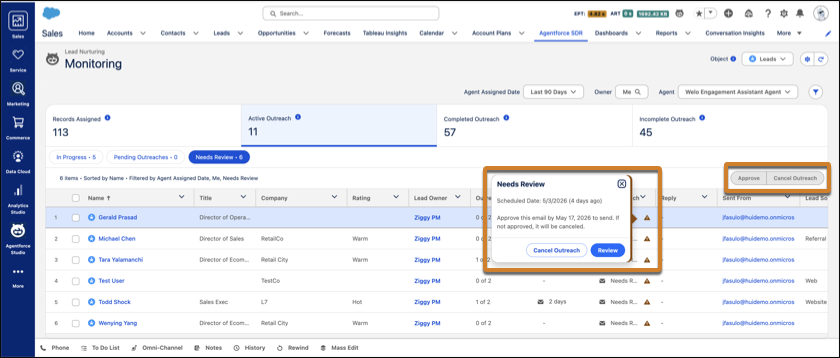
- Needs Review - The number of agent emails waiting for review by the prospect record owner or their manager. These emails can be edited, approved, or canceled from the list view. This number appears only when Review Before Send is turned on in the agent setup. If Send as Seller is also turned on for the agent, only the record owner can approve emails sent on their behalf.
- Completed Outreach
- The number of records an agent has finished engaging.
- Replied - The number of records that have replied to an agent email.
- Meeting Booked - The number of records that have booked a meeting.
- Total Qualified - The number of records that have been rated “hot” by the agent. This number appears only when Qualification is turned on in the agent setup.
- Opted Out - The number of records that opted out of email.
- No Response - The number of records that never replied to the agent’s emails.
- Canceled - The number of records manually canceled by a Salesforce user. Canceling agent outreach immediately stops emails from being sent to the prospect.
- Incomplete Outreach
- The number of records that have errors.
- Errors - The number of records that encountered errors during an outreach attempt.
- Eligible for Retry - The number of records with errors that can be tried again. To retry an agent outreach, select a prospect from the list and choose Retry Agent Outreach from the row-level action menu.
Click a sub-metric within the tab to see only the records for that sub-metric.
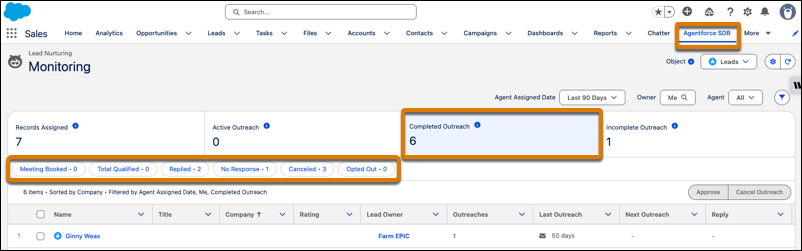
Sales managers can filter results by time period, agent, object, and record owner. You can also choose which columns to display in the list views.
If your agent has Require Manual Approval turned on, the Active Outreach tab shows the number of pending emails awaiting review. Sales managers or reps can click to review or approve emails directly from the Control Center.
To retry an agent outreach, select a prospect from the list and choose Retry Agent Outreach from the row-level action menu.
To cancel an agent outreach, select prospects from the list and click Cancel Outreach.
Each list view in the Control Center can display a maximum of 2000 records.
