
Loading
Salesforce now sends email only from verified domains. Read More
AI Agents for Sales
Table of Contents
Select Filters

          No results
          No results
          Here are some search tips

          Check the spelling of your keywords.
          Use more general search terms.
          Select fewer filters to broaden your search.

          Search all of Salesforce Help
          Review, Edit, and Approve Agent Emails

          Review, Edit, and Approve Agent Emails

          When a Lead Nurturing agent is set up with Review Before Send turned on, it puts each generated email into a queue for review by the prospect owner or their manager. If Send as Seller is also turned on for the agent, only the record owner can approve emails sent on their behalf. Emails waiting for review appear in the Activity Timeline on prospect records and in the Lead Nurturing Control Center.
          Required Editions

          Available in: Lightning Experience in Enterprise, Performance, and Unlimited editions with Sales and Einstein for Sales.
          User Permissions Needed
          To review, edit, or approve an Agentforce Lead Nurturing email to a prospect:

          Use Agentforce SDR App

          AND

          Sales Engagement User

          OR

          Sales Engagement Cadence Creator

          AND

          Ownership of the prospect

          OR

          Configure Agentforce SDR App

          Review emails in the Activity Timeline

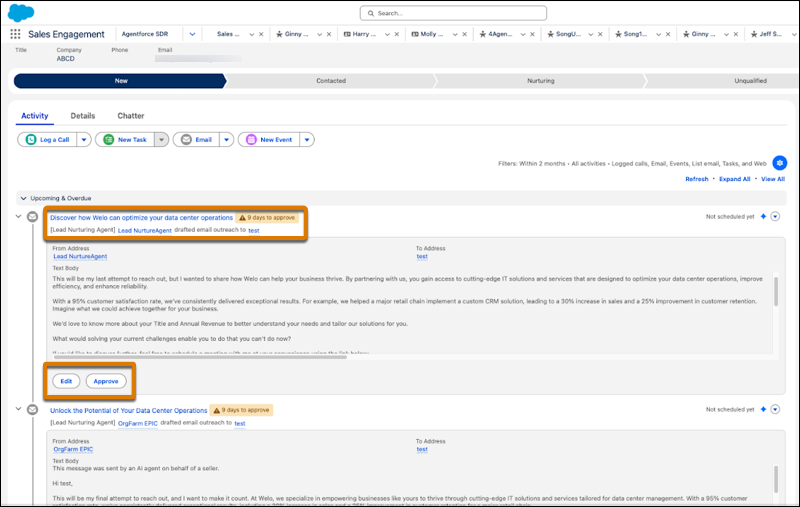
          To review emails in a prospect’s Activity Timeline, open the lead, contact, or person account record and view the Timeline. Emails that are generated and waiting for review appear in the Timeline.

          To view the content and details of an email, click to expand it. To make changes, click Edit. To send the email as-is, click Approve.

          Edit and approve agent emails in the Activity Timeline.

          Review emails in the Lead Nurturing Control Center

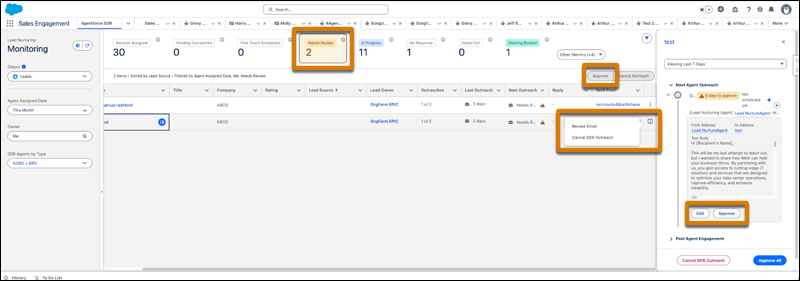
          To see a list of emails awaiting review in the Control Center, click the Needs Review total.

          To approve, edit, or cancel an email, click the Action menu next to the email and choose Review Email.

          View, edit, and approve agent emails in the Control Center.

           
          Loading
          Salesforce Help | Article