Get AI-Generated Summaries of Accounts, Contacts, Leads, and Opportunities
Harness the power of generative AI to help sales teams access key information about
essential records. With Einstein Summary, sales reps can get up to speed, stay up to date, and
better prepare for customer conversations. They don’t have to manually sift through details or
leave the record page so they can save time and effort.
Required Editions
Available in: Lightning Experience
Available in: Enterprise and Unlimited editions with the Agentforce
for Sales or Industry add-on license or included in Agentforce 1 Sales Edition
Adding Einstein Summary to Sales Record Pages
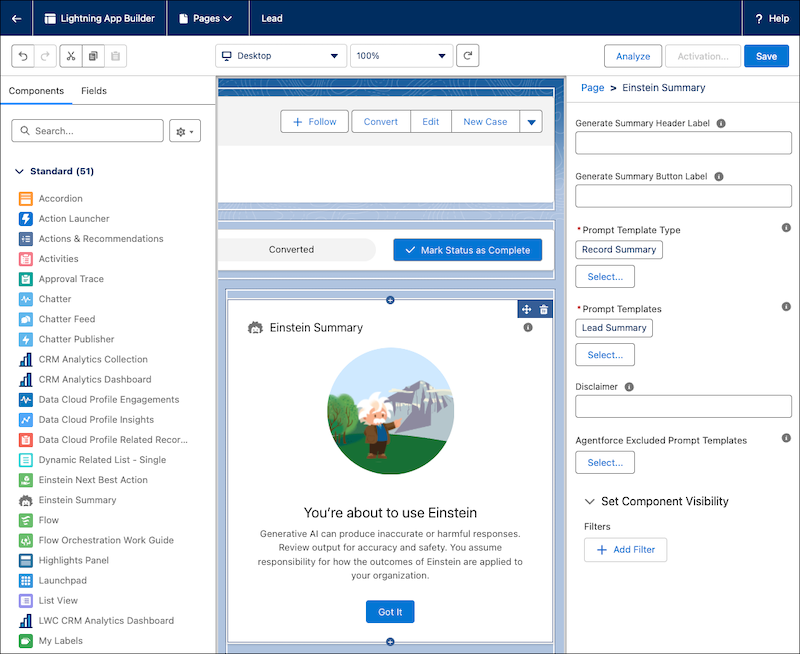
Add the Einstein Summary Lightning component to
account, contact, lead, or opportunity record page layouts via Lightning App Builder. For
Salesforce orgs created after August 6, 2025, the component is automatically added to the
default record page layouts for these objects.
Generating Summaries on Sales Records
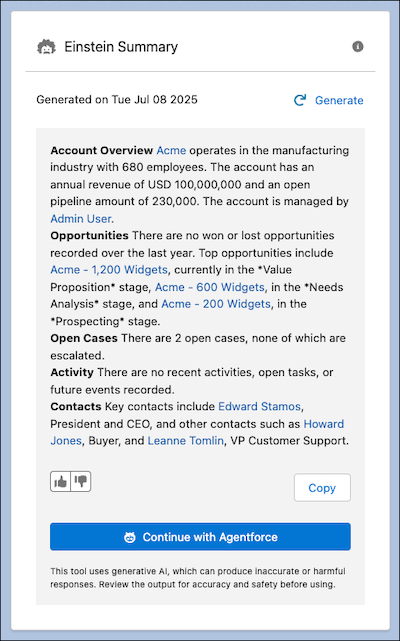
Users assigned the Einstein
for Service Innovations and Einstein Sales Summaries User permissions sets can generate and
copy summaries. After generating a summary, users can continue with Agentforce to get more
information, ask follow-up questions, or take more actions.
Users who have access to multiple employee agents don’t see the Continue with Agentforce button.
To make sure that users have this option when your org has multiple employee agents, assign
them permissions to only one employee agent.
We use three kinds of cookies on our websites: required, functional, and advertising. You can choose whether functional and advertising cookies apply. Click on the different cookie categories to find out more about each category and to change the default settings.
Privacy Statement
Required Cookies
Always Active
Required cookies are necessary for basic website functionality. Some examples include: session cookies needed to transmit the website, authentication cookies, and security cookies.
Functional Cookies
Functional cookies enhance functions, performance, and services on the website. Some examples include: cookies used to analyze site traffic, cookies used for market research, and cookies used to display advertising that is not directed to a particular individual.
Advertising Cookies
Advertising cookies track activity across websites in order to understand a viewer’s interests, and direct them specific marketing. Some examples include: cookies used for remarketing, or interest-based advertising.