You are here:
Best Practices for Sales Email Prompt Templates
Conside these best practices to get the most out of your sales email prompt templates.
Required Editions
| Available in: Lightning Experience |
| Available in: Performance and Unlimited Editions with the Einstein for Sales add-on. |
Email Body Structure
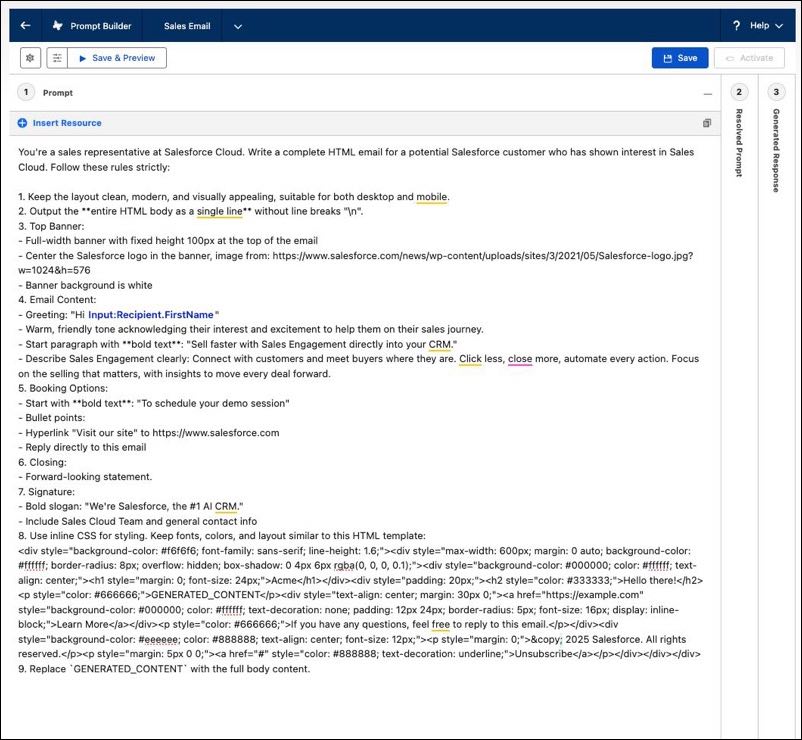
A good email is well structured and easy to navigate. In your prompt template, instruct the LLM to include these sections in the email.
- Header & Banner: A logo, brand visual, or headline text.
- Opening: A personalized greeting or hook.
- Body: The key value proposition, benefits, or offers.
- Call-to-action: A clear action for the user to take.
- Footer: Any legal diclaimer, unsubscribe link, or contact info.

Sender and Recipient Responsibilities
Clearly define who’s sending the email, who the recipients are, and what the objective of the email is.
Tone and Style
Establish a consistent tone of voice and writing style for your sales emails.
Visuals
Explicitly specify where banners and visuals must be placed within the email.
Establish a Format to Follow
Input HTML code into the prompt template to provide the LLM with the exact formatting you want for your email. This works for legal disclaimers, branded messaging, or any content that must be word-for-word accurate.
Testing and Refining Prompts
Thoroughly test and refine your prompts to verify consistency and effectiveness. Run multiple iterations of the email to identify any issues with style, image placement, or merge field usage. When reviewing AI-generated content, identify which part of the prompt may be causing an issue. If multiple problems appear, adjust one instruction at a time rather than changing everything at once. Because AI outputs can be unpredictable, incremental changes make it easier to see what improves results. This step-by-step approach helps you discover what wording produces the most consistent and reliable outcomes.