Use Consumption Forecasts to view and predict revenue for a consumption-based business
within a specific timeframe. The forecasts page consists of various forecast types, each
providing a consolidated view. These forecasts display totals and subtotals of consumption
amounts, organized by forecast rollup and time period. Forecasts can include adjustments made by
forecast managers to their associates' forecasts and by associates to their own
forecasts.
Required Editions
Available in: Lightning Experience
Available in: Enterprise, Unlimited with Sales, and in
Agentforce 1 Sales Edition
Consumption Forecasts uses the forecast hierarchy to roll up consumption data into forecasts
for your teams. The organization of forecasts in each forecast type varies based on user
roles: forecast manager and associate.
Forecast Manager View
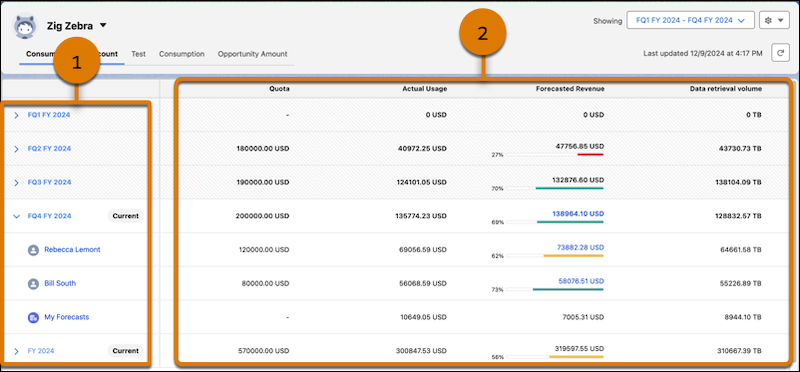
This image illustrates the forecast manager’s view with forecast projections for the quarters in
the current year.
The quarters in the current year are shown (1). Expand each quarter to see the names of
immediate subordinates (associates) and a link to the associate view if the manager owns
any accounts. To view an associate’s forecasts, select their name. If the associate has
their own subordinates, the view remains the same. Otherwise, the associate view is
shown.
The forecast measures for each quarter are shown in these columns (2).
Associate View
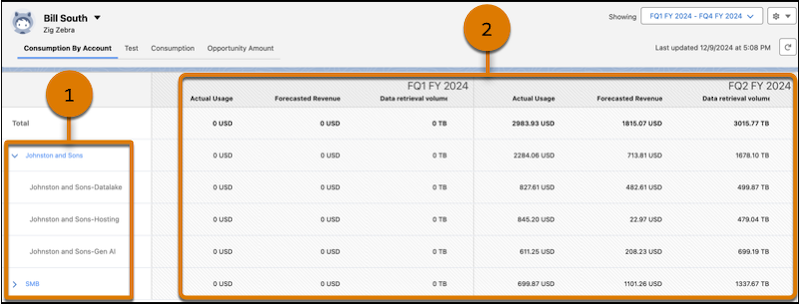
This image illustrates the associate’s view with forecast
projections for products or services in an account for the quarters in the current year.
On the left side, a list of accounts that the associate owns is shown (1). Expand the
account to show the products or services that fall under the account.
The forecast projections for each quarter in the year are shown in these columns
(2).
Adjust Forecasts Forecast managers can adjust forecast totals for themselves and their immediate associates. Associates can adjust their own forecasts and those of subsequent products or services, depending on the defined ownership.
Increase or Decrease Forecasts for Upcoming Periods Increase or decrease forecasts by a percentage based on the forecast value you want to adjust for the selected upcoming periods, starting from the next period.
Adjust Forecasts Based On Total Value Configure adjustments to automatically adjust forecasts by a percentage of the total value for the selected upcoming periods.
Did this article solve your issue?
Let us know so we can improve!
Loading
Salesforce Help | Article
Cookie Consent Manager
General Information
Required Cookies
Functional Cookies
Advertising Cookies
General Information
We use three kinds of cookies on our websites: required, functional, and advertising. You can choose whether functional and advertising cookies apply. Click on the different cookie categories to find out more about each category and to change the default settings.
Privacy Statement
Required Cookies
Always Active
Required cookies are necessary for basic website functionality. Some examples include: session cookies needed to transmit the website, authentication cookies, and security cookies.
Functional Cookies
Functional cookies enhance functions, performance, and services on the website. Some examples include: cookies used to analyze site traffic, cookies used for market research, and cookies used to display advertising that is not directed to a particular individual.
Advertising Cookies
Advertising cookies track activity across websites in order to understand a viewer’s interests, and direct them specific marketing. Some examples include: cookies used for remarketing, or interest-based advertising.