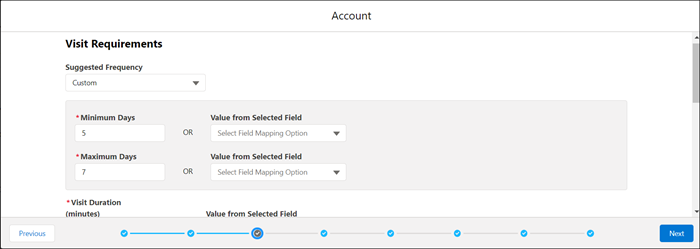
In the dataset wizard, under Visit Requirements, enter the days between visits in
Minimum Days and Maximum Days. As a
shortcut, select a frequency from the Suggested Frequency list.
For example, each account requires three visits over a 90-day period, or one a
month. You divide the total days in the period by the number of expected visits, and you
set Maximum Days to 30 and Minimum Days to 27.
If an object field contains your visit frequency, select the field from
Value from Selected Field. If the field doesn’t contain a value,
then routes use the values in Minimum Days and Maximum
Days.
Enter visit duration and buffer time in minutes, or select the field from
Value from Selected Field.
Buffer time is additional time to add to the Salesforce-calculated travel time between
visits to account for unexpected delays, such as traffic congestion. Or, time for reps to
take notes or walk across large parking facilities.
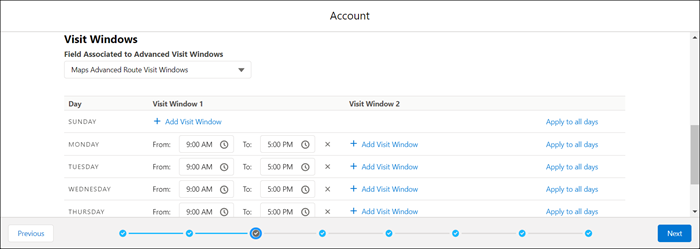
Under Visit Windows, specify the days and times for customer visits for this dataset.
If a field on your routable object contains your visit window, select that field
from the Field Associated to Advanced Visit Windows list.
If there are two windows for visits on the same day, you can add a window.
For example, store franchise customers prefer visits from 9:00 AM to 11:00 AM,
and then again from 1:00 PM to 4:00 PM.
Click Next.
Field filters for future visits appear in the dataset wizard.
We use three kinds of cookies on our websites: required, functional, and advertising. You can choose whether functional and advertising cookies apply. Click on the different cookie categories to find out more about each category and to change the default settings.
Privacy Statement
Required Cookies
Always Active
Required cookies are necessary for basic website functionality. Some examples include: session cookies needed to transmit the website, authentication cookies, and security cookies.
Functional Cookies
Functional cookies enhance functions, performance, and services on the website. Some examples include: cookies used to analyze site traffic, cookies used for market research, and cookies used to display advertising that is not directed to a particular individual.
Advertising Cookies
Advertising cookies track activity across websites in order to understand a viewer’s interests, and direct them specific marketing. Some examples include: cookies used for remarketing, or interest-based advertising.