Determine what data you want to show in Salesforce Maps according to your business
development and prospecting needs. Customize the data source, filter results, and style the data
layer.
Important Always use the Salesforce Maps user interface for creating records related to the managed package objects. Creating records outside of the user interface or adding automation on the managed package objects isn’t supported. See Support for records created outside of the Maps user interface in Salesforce Knowledge.
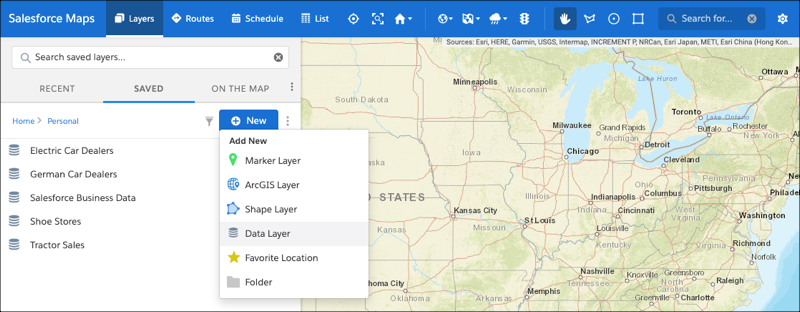
Click Layers.
To save the data layer privately so only you can see it, click Saved | Personal. Or, to share the data layer with other maps users, click Saved | Corporate.
Hover over New and select Data Layer.
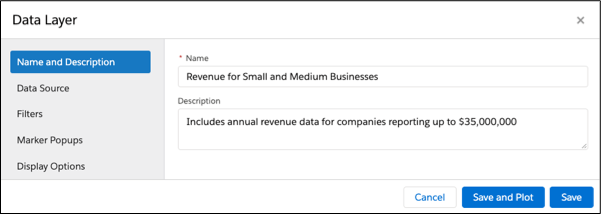
Name the data layer and select the data source, filter, and style options you want the data
layer to show. Popups provide helpful default topics preselected for some data sources, which
you can edit at any time.
Save your changes.
Data layers plot results in the visible map area by default. To plot the data layer in
different area, move the map and refresh the layer.
Tip Using the data plotted on
the map, create Salesforce records quickly with Salesforce Maps Click2Create.
We use three kinds of cookies on our websites: required, functional, and advertising. You can choose whether functional and advertising cookies apply. Click on the different cookie categories to find out more about each category and to change the default settings.
Privacy Statement
Required Cookies
Always Active
Required cookies are necessary for basic website functionality. Some examples include: session cookies needed to transmit the website, authentication cookies, and security cookies.
Functional Cookies
Functional cookies enhance functions, performance, and services on the website. Some examples include: cookies used to analyze site traffic, cookies used for market research, and cookies used to display advertising that is not directed to a particular individual.
Advertising Cookies
Advertising cookies track activity across websites in order to understand a viewer’s interests, and direct them specific marketing. Some examples include: cookies used for remarketing, or interest-based advertising.