Expand your business into untapped and underserved communities and diversify your
recruiting efforts among key populations using Salesforce Maps demographic data. Concentrations of
your search results appear on a map and help you identify where to focus your energy.
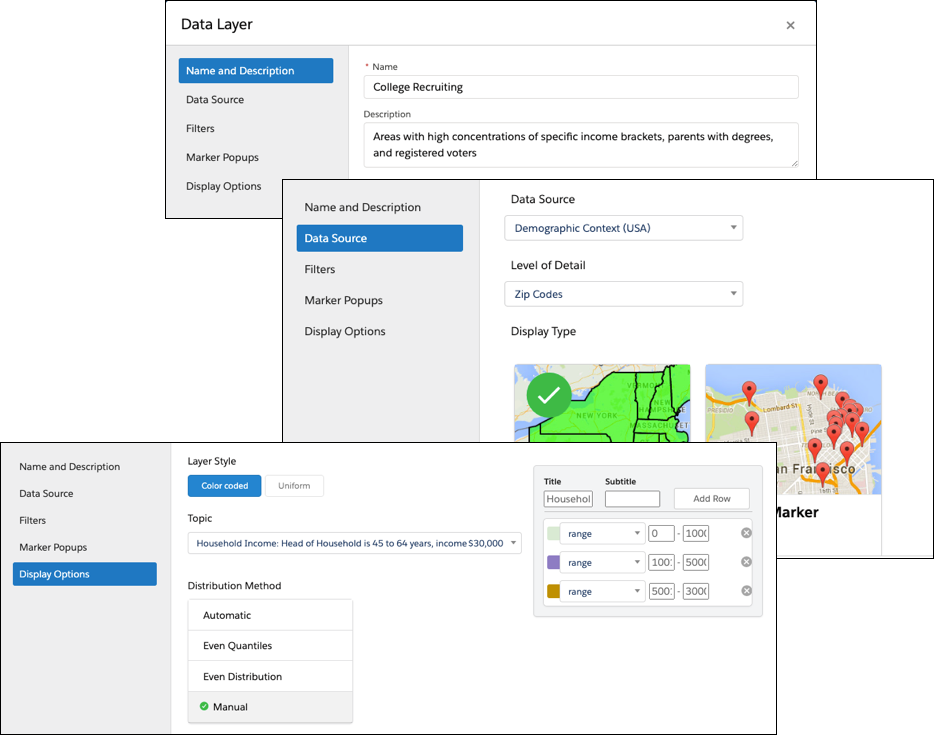
In Salesforce Maps, you create data layers using the Demographic Context (USA) data source and
filters that you define.
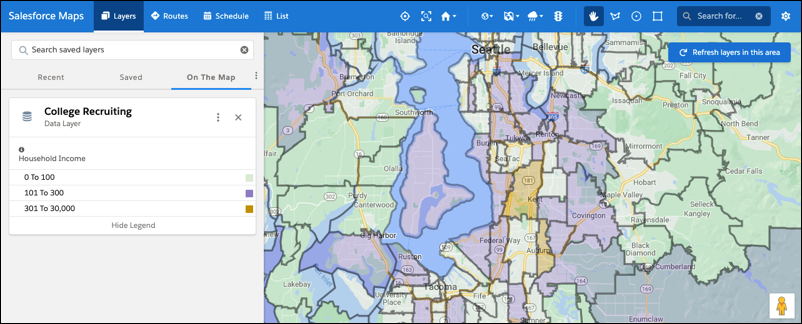
Plot the data layer on the map, which shows concentrations of households who earn income based
on the display options that you specify.
After you identify concentrated areas, determine where to focus your efforts.
These examples illustrate how different institutions and businesses can use demographic data
available in Salesforce Maps for identifying populations and areas of interest for business and
recruitment expansion.
Example
Demographic Data That Helps Identify Populations and Areas of Interest
Diversify your recruiting efforts
A college wants to increase applications in lower socioeconomic areas. Factors that
matter to the college board include:
Annual household income
Children by age range
Graduation rates among parents
Provide products and services to underserved communities
A regional agricultural supply company considers expanding to another location within
an 80-mile radius of its flagship store. The company’s leadership considers ZIP codes and:
Annual household income up to $70,000
Household size
People employed in agriculture and related trades
Identify specific populations
A residential care provider investigates locations for opening a facility in a county
that has high concentrations of:
People age 75–84
Households earning at least $72,000 annually
Did this article solve your issue?
Let us know so we can improve!
Loading
Salesforce Help | Article
Cookie Consent Manager
General Information
Required Cookies
Functional Cookies
Advertising Cookies
General Information
We use three kinds of cookies on our websites: required, functional, and advertising. You can choose whether functional and advertising cookies apply. Click on the different cookie categories to find out more about each category and to change the default settings.
Privacy Statement
Required Cookies
Always Active
Required cookies are necessary for basic website functionality. Some examples include: session cookies needed to transmit the website, authentication cookies, and security cookies.
Functional Cookies
Functional cookies enhance functions, performance, and services on the website. Some examples include: cookies used to analyze site traffic, cookies used for market research, and cookies used to display advertising that is not directed to a particular individual.
Advertising Cookies
Advertising cookies track activity across websites in order to understand a viewer’s interests, and direct them specific marketing. Some examples include: cookies used for remarketing, or interest-based advertising.