
You are here:
Cadence Builder 2.0 Cadences
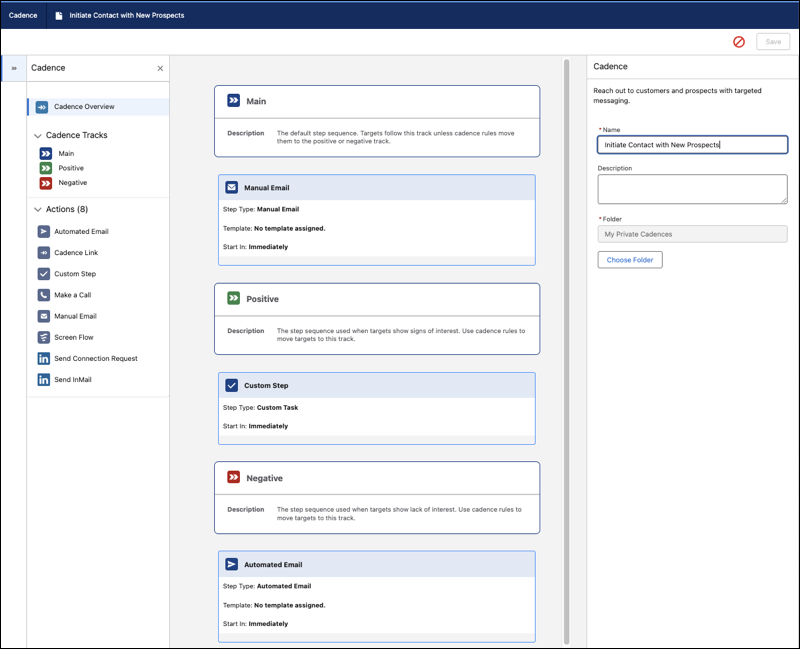
Cadence Builder 2.0 cadences are responsive to target engagement, using three separate tracks—main, positive, and negative—to hold cadence steps appropriate to different target engagements. Entry rules for each track let targets move to the appropriate track based on their engagements, whenever they occur.
Required Editions
| Available in: Lightning Experience |
| Available with Sales Engagement, which is included with Sales in Performance, Einstein 1, and Unlimited Editions, and available for an extra cost in Professional and Enterprise Editions. Sales Engagement is also available for an extra cost in Service and Lightning Platform. |

Cadence creators can build cadences with separate tracks, or series of steps, for targets of different levels of interest or engagement.
- A main track, usually with steps for targets who haven't yet engaged
- A positive track for targets who have engaged or shown interest
- A negative track for targets that have expressed a lack of interest
The builder canvas lets you see the steps in each track, drag steps to and from a track, and configure step details, all in one view.
Cadence creators can use each track in the way that makes sense for their team and can set rules to control when a target moves from one track to another. Targets can move from track to track at any time based on the track entry rules. For example, the positive track can have an entry rule that moves a target to that track when they click a link in an email sent in a previous step in either of the other two tracks.
When track entry rules cause a target to move from one track to another, the cadence cancels the target's current step and moves the target to the first step of the new track. The start time of the first step is the later of the start time of the canceled step and the first step of the new track. This timing prevents the track change from causing two steps to occur closer together than the cadence designer intended. For example, if a target's current step on the main track starts in one day but an entry rule sends the target to a step that's set to start immediately, that new step starts in one day instead.
Cadence authors create steps and cadence exit rules in the same way in Cadence Builder 2.0 and Cadence Builder Classic.
Considerations
Keep in mind these considerations when using Cadence Builder 2.0.
- Exit rules on the main track apply to all tracks. When an exit rule condition is met, the target leaves the cadence no matter which track they're on. Exit rules don't apply to the last step of the main track if the step is an email step.
- Targets can move between tracks based on the track entry rules, but can't move back to a previously visited track.
- You can only use each specific engagement event in one entry or exit rule.
- We recommend planning your cadence steps from start to finish before beginning to build a cadence.
- You can connect multiple cadences with cadence links. Linked cadences can be used to implement more complex cadence engagement response scenarios.
- Scheduled cadence steps appear as tasks in the Activity Timeline on prospect records. These are proxy tasks generated by Salesforce. When the cadence step is completed, the proxy task is deleted and replaced by a completed activity record.
