
You are here:
Example: A Simple Branched Cadence in Cadence Builder Classic and Cadence Builder 2.0
See how a simple branched cadence looks in both versions of the Cadence Builder.
Required Editions
| Available in: Lightning Experience |
| Available with Sales Engagement, which is included with Sales in Performance, Einstein 1, and Unlimited Editions, and available for an extra cost in Professional and Enterprise Editions. Sales Engagement is also available for an extra cost in Service and Lightning Platform. |

Note To watch a video demonstration of building a cadence with Cadence Builder 2.0, see Cadence Builder 2.0.
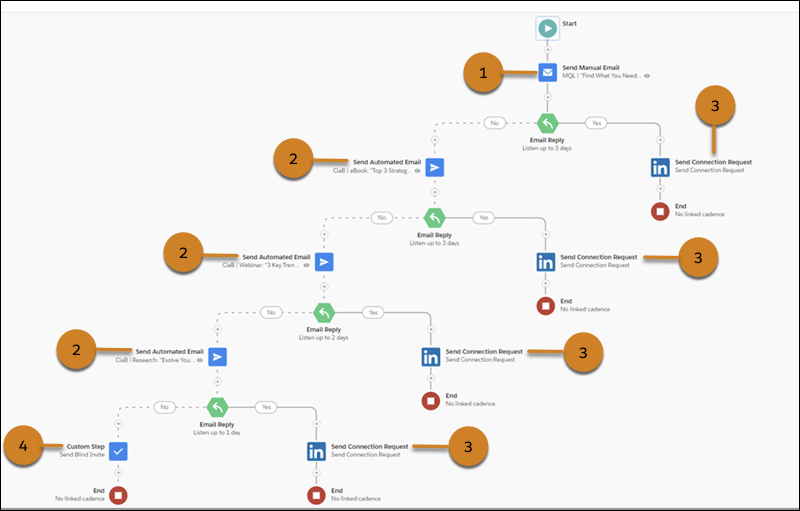
This social engagement cadence uses an email reply as a favorable signal to connect on LinkedIn. The cadence includes nine steps that run over approximately 9 days.
In Cadence Builder Classic, the cadence includes these elements.
- Four decision branches
- Four listener steps listening for Email Reply engagement events
- Nine cadence actions
- One manual email (1)
- Three automated emails (2)
- Four LinkedIn Connection Requests (3)
- One custom step (4)
- Four different email templates
Each branch includes a listener step that listens for a reply to the previous email step. Each listener step sends the target to a LinkedIn Connection Request step if they reply.
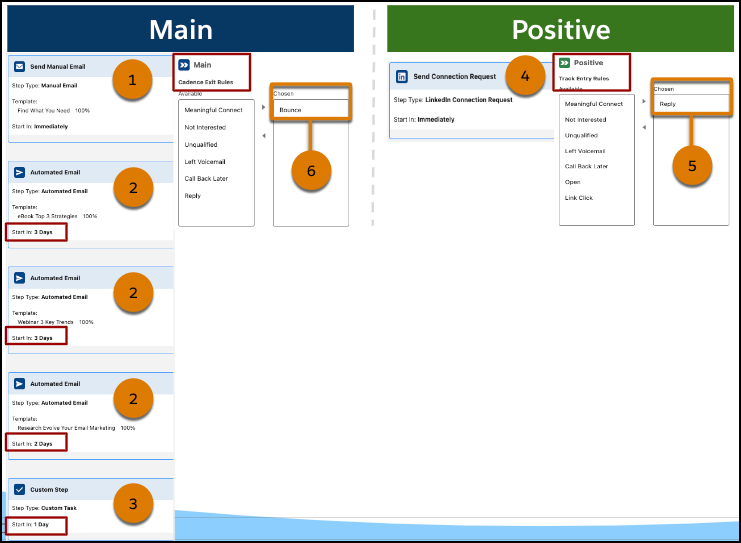
In Cadence Builder 2.0, targets enter at step one on the Main track.
- The Main track includes one manual email (1), three automated emails (2), and one custom step (3).
- The Positive track includes a single LinkedIn Connection Request step (4).
- Track entry rules on the Positive track move the target from the Main track to the Positive track if they reply to any of the emails sent (5).
- The cadence exit rules remove the target from the cadence if any of the emails bounce (6). Otherwise, targets exit the cadence when they complete the last step of the branch they’re on.
- Step timing is set for each step in the same way as Cadence Builder Classic.
- The target can enter each track only once.
- No steps are needed on the Negative track because the cadence is only listening for a positive email reply engagement. If there’s no engagement, the target stays on the Main track.
Did this article solve your issue?
Let us know so we can improve!
