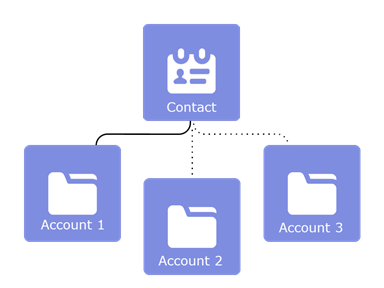
People often work with more than one company. A business owner might own more than
one company or a consultant might work on behalf of multiple organizations. Relate a single
contact to multiple accounts so you can easily track the relationships between people and
businesses without creating duplicate records.
Required Editions
Available in: both Salesforce Classic and Lightning
Experience
Available in: Contact Manager, Group, Professional,
Enterprise, Performance, Unlimited, and Developer
Editions
When you use Contacts to Multiple Accounts, each contact still requires a primary account
(the account in the Account Name field). The contact and its primary
account have a direct relationship. But you can add other accounts to the contact.
These secondary account-contact relationships are indirect.
Contacts to Multiple Accounts works with person accounts. That means a person account can be
either a related contact on a business account or a related account on a contact. A person
account can also be related to another person account as either a related contact or related
account. When you relate a person account to an account or contact, the relationship is always
indirect. That’s because person accounts don’t have primary accounts, so person accounts can’t
be directly related to business accounts. And person accounts can't be primary accounts for
contacts, so person accounts can't be directly related to contacts. When Contacts to Multiple
Accounts is enabled, an Account Contact Relationship record is created for each contact with a
primary account, and for each person account.
Contacts to Multiple Accounts can't be enabled with the Metadata API.
Tip We recommend turning on this feature outside of regular business hours to ease
setup if your org has a large number of contacts.
Example John Smith is president of Acme Corporations, and Acme is the account on his contact
record. But John is also involved with the nonprofit media organization Greendot Media. By
adding Greendot Media as a related account on John’s contact record, you can track this other
relationship. John is considered a direct contact to Acme because Acme is the account
on his contact record. And he’s considered an indirect contact to Greendot Media and
any other accounts that he becomes related to. John also appears on the Related Contacts
related list for Greendot Media and any other accounts that he’s indirectly related
to.
We use three kinds of cookies on our websites: required, functional, and advertising. You can choose whether functional and advertising cookies apply. Click on the different cookie categories to find out more about each category and to change the default settings.
Privacy Statement
Required Cookies
Always Active
Required cookies are necessary for basic website functionality. Some examples include: session cookies needed to transmit the website, authentication cookies, and security cookies.
Functional Cookies
Functional cookies enhance functions, performance, and services on the website. Some examples include: cookies used to analyze site traffic, cookies used for market research, and cookies used to display advertising that is not directed to a particular individual.
Advertising Cookies
Advertising cookies track activity across websites in order to understand a viewer’s interests, and direct them specific marketing. Some examples include: cookies used for remarketing, or interest-based advertising.