
You are here:
Create a Clawback Rule in Salesforce Spiff
Track reclaimed commission payouts with a clawback rule in Salesforce Spiff. A clawback is when a company reclaims a commission previously paid to a rep. Typically, clawbacks occur when a deal is canceled or terminated after a commission is disbursed. In Spiff, a clawback is often represented as a negative entry in a data filter for opportunities or deals, with a reference to the original opportunity for accountability.
Required Editions
| Available in: both Salesforce Classic (not available in all orgs) and Lightning Experience |
| Available in: Enterprise, Unlimited, and Developer Editions |
| Available for an additional cost in: Professional Edition with Web Services API Enabled |
| User Permissions Needed | |
|---|---|
| To create a clawback rule: | A Spiff user role with this permission turned on. Designer Configuration: Manage |
In this example, a rep closes a deal in June and receives a $500 commission payout. In August, the deal is canceled, but now the admin must reclaim the $500 commission that was paid. The reclaimed amount is the same amount that was paid, and the amount towards quota attainment isn't deducted from total attainment.
-
Create a data filter that identifies any cancellations for reclaiming commission paid.
For example, create a one-to-one relationship, OpportunityToClawback, that matches the Opportunity object's Id field with the Clawback object's Opportunity_Id field. See Set Up a Data Relationship in Salesforce Spiff.
-
Create a data filter, ClawbackInPeriod__Opp, that identifies the clawback for the period.
Using the
date_between?()function, check whether the clawback occurred during a specific period.date_between?(OpportunityToClawback.Clawback_Date,BeginningOfMonth,EndOfMonth)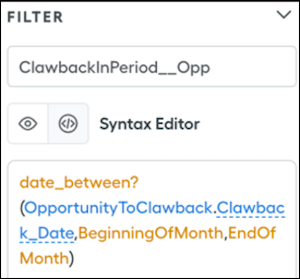
-
Create a data filter, ClawbackByRepInPeriod, that further filters the ClawbackInPeriod__Opp results by rep.
ClawbackInPeriod__Opp AND ByRep -
In Designer, go to Plans and create a datasheet named ClawbackInPeriodData.
Object Opportunity Data filter ClawbackByRepInPeriod Fields Account_Name__c, ARR__c, CloseDate, and Clawback_Date -
Set up the attainment calculation.
-
With the
quotas()function, reference the annual quota for the current year and the quota for the year in which the deal closed.If the clawback is from a previous year, reference that year's quota. If the clawback is from a deal that closed earlier in the current year, reference this year's quota. -
Create a calculated field, ClawbackAmountInPeriod, for the clawback amount.
This formula depends on other fields that you create next.
ClawbackAmountInPeriod = OppARR * CommissionRateClawback -
Define the CommissionRateClawback formula.
This formula uses the
mpercent()function to calculate the rate that was used when the deal closed. This formula requires a range table, SalesRepAcceleratorTable, with different payout tiers based on attainment.=mpercent(YTDAttainmentAttributableToOppClawback, SalesRepAcceleratorTable, YTDAttainmentAsOfPriorOppClawback) -
Define the YTDAttainmentAttributableToOppClawback formula.
Divide ARR by the quota field for the year when the deal closed.
-
Define the YTDAttainmentAsOfPriorOppClawback field .
Subtract YTDAttainmentAsOfThisOppClawback from YTDAttainmentAttributableToOppClawback.
-
Define the YTDAttainmentAsOfThisOppClawback field.
=YTDQuotaRetirementAsOfThisOppClawback / QuotaInFiscalYearOfCloseDate - Define the QuotaInFiscalYearOfCloseDate field by referencing the quota from the year that the deal closed.
-
Define the YTDQuotaRetirementAsOfThisOppClawback field with the
let()function.Thelet()function assigns a temporary name to a given value and uses that value when evaluating the expression. For a clawback, thelet()function can dynamically accumulate previous ARR values. Divide the historical ARR accumulation by the quota for the period.=let(ThisOppCloseDate, CloseDate, let(ThisOppID, Id, sumif(ClosedWonByRepNewAllTime, year(CloseDate) = year(ThisOppCloseDate) AND CloseDate <= ThisOppCloseDate AND if(CloseDate = ThisOppCloseDate, Id <= ThisOppID, TRUE), ARR__c)))
-
With the
- Add the ClawbackAmountInPeriod field as a payout rule.
