
You are here:
Considerations for Setting Up the Salesforce Spiff Commission Estimator
Setting up the Salesforce Spiff Commission Estimator for quotes and opportunities includes several configuration steps and decisions. Before you get started, review some important considerations.
Required Editions
| Available in: both Salesforce Classic (not available in all orgs) and Lightning Experience |
| Available in: Enterprise, Unlimited, and Developer Editions |
| Available for an additional cost in: Professional Edition with Web Services API Enabled |
Environments
The Spiff Commission Estimator is compatible with any Salesforce org that you connect in Spiff, including Salesforce sandboxes.
Users
Decide how many users can access the estimator, and which users you expect to use it the most. Individual contributors have the biggest impact on their sales deals and they have the most pay variability based on the details of each deal.
Estimate Basis
As you set up and test, remember that estimates are shown based on each individual that's viewing the opportunity or quote. Estimates don't show who owns the opportunity.
Object for Commission Estimates
Decide where you want users to see their commission estimates.
| Object | Considerations |
|---|---|
| Opportunity |
|
| Quote |
|
| Both Opportunity and Quote | Give your reps the most flexibility, depending on the plan. |
Components or Payout Rules
Decide which components or payout rules you want to use the estimator for.
If a commission payout rule is based on an individual opportunity or quote and its related line items, that rule is a good candidate for the estimator. The estimator doesn’t support payout rules that measure activity (leads) or counts of opportunities, and anything from external systems.
Different plans can have multiple payout rules for estimation. You can share payout rules with other plans, but the rules used with the estimator can differ between plans. Therefore, before you begin configuration in Spiff, note which payout rules require estimates for each plan.
Reusing Payout Rules
If you configure Spiff Commission Estimator for the same object that your primary commission payout rules are based on, you can reuse those payout rules with the estimator. Turn on Exclude from Estimator in the data filter.
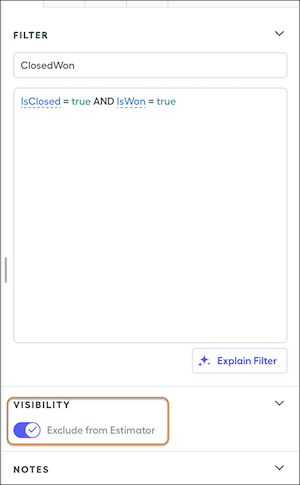
For example, consider the default ClosedWon, InPeriod, and InQuarter filters. If one of these filters has this option turned on and the Spiff Commission Estimator uses the filter, Spiff ignores the conditions and falls back to default commission rules for generating the commission estimate.
When you don't want to include a What-If? rule on rep commission statements or if you configure the estimator for a different object than the regular commission payout rule uses, create a separate rule for the estimator. If you don't want to show a What-If? rule on a statement, you can use a ghost rule instead.
