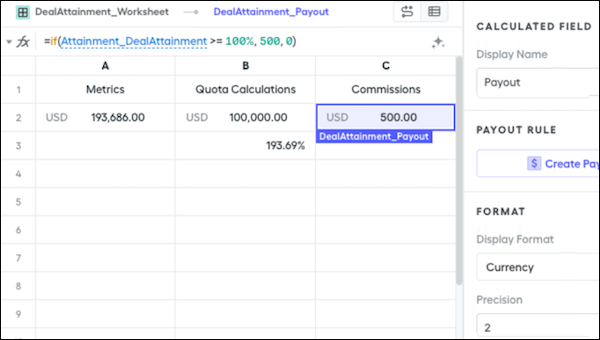
For lump-sum rules, the final payout calculation comes from a single cell in a worksheet. Worksheets contain formulas that have a single value, either entered directly or as the result of a formula. The result of 2 + 2 is 4, a single value. We don't calculate data for every record in the data filter that’s used.
Required Editions
Available in: both Salesforce Classic (not available in all orgs) and Lightning
Experience
Available in: Enterprise, Unlimited, and Developer
Editions
Available for an additional cost in: Professional Edition with Web
Services API Enabled
User Permissions Needed
To create a lump-sum rule:
A Spiff user role with these permissions turned on.
Designer Configuration: Manage
Quotas: Edit
Create a folder for the rule.
In Designer, click the three dots next to the plan you’re creating the rule for, and click New Folder.
Rename the rule folder.
Create a quota table.
Click the three dots next to the rule folder and select New Quota Table.
Set up the quota table with reps, quotas, and change periods.
Create a worksheet in the rule folder.
Click the three dots next to the rule folder and select New Worksheet.
Set up the worksheet with labeled columns and functions, attainment, and commission fields,.
Add the new rule as a payout rule.
Click a plan in the left panel and click New Payout Rule.
Name the rule and select the commission calculation field as the payout amount.
We use three kinds of cookies on our websites: required, functional, and advertising. You can choose whether functional and advertising cookies apply. Click on the different cookie categories to find out more about each category and to change the default settings.
Privacy Statement
Required Cookies
Always Active
Required cookies are necessary for basic website functionality. Some examples include: session cookies needed to transmit the website, authentication cookies, and security cookies.
Functional Cookies
Functional cookies enhance functions, performance, and services on the website. Some examples include: cookies used to analyze site traffic, cookies used for market research, and cookies used to display advertising that is not directed to a particular individual.
Advertising Cookies
Advertising cookies track activity across websites in order to understand a viewer’s interests, and direct them specific marketing. Some examples include: cookies used for remarketing, or interest-based advertising.