Territory Planning helps you design optimal territories for sales and service teams.
Compare scenarios that help you close gaps in sales and service coverage, distribute the workload
fairly, and maintain balanced territories. You choose the best scenario to establish your
territory model.
Required Editions
Available in: both Salesforce Classic (not available in all orgs) and Lightning Experience
Available in: Professional, Enterprise, Performance, Unlimited, and Developer Editions with Web Services API enabled
Territory Planning helps sales and service operations manage and rebalance territories.
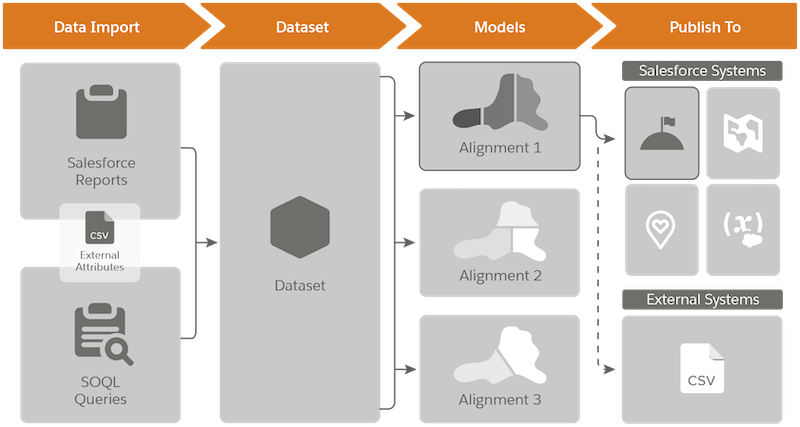
Specifically, it helps teams:Review what happens when you import Salesforce data into Territory
Planning.
Stage
What’s Happening Here
Data Import
You import data, such as accounts, leads, opportunities, and cases using Salesforce
reports and queries.
Supplement the data that you import with attributes from external
sources in a CSV file.
Dataset
Territory Planning stores the Salesforce data that you import in datasets. Think of
them as snapshots of your Salesforce data. Each dataset stores as many as 250,000
records.
Models
From your datasets, you create territory models, which we call alignments.
Easily compare alignments, and then optimize them. If you want, further supplement your
alignments with attributes from external sources in a CSV file.
Publish To
You choose where to publish your alignments.
Salesforce Systems
Automate processes that create models, territories, and assignment rules in Sales
Territories.
Plot shape layers based on the territories that you design for Salesforce Maps.
Create and update map-based service territories in the form of polygons in Field
Service.
Update specific Salesforce fields with optimized territory data.
External Systems
Pack your alignment data in CSV files for importing into other systems that your
business relies on.
Align territories with account, user, and critical business data.
Distribute sales opportunities and service requests in an equitable way.
Swiftly optimize territories to meet demands of the changing times and their effects on
staffing levels.
Did this article solve your issue?
Let us know so we can improve!
Loading
Salesforce Help | Article
Cookie Consent Manager
General Information
Required Cookies
Functional Cookies
Advertising Cookies
General Information
We use three kinds of cookies on our websites: required, functional, and advertising. You can choose whether functional and advertising cookies apply. Click on the different cookie categories to find out more about each category and to change the default settings.
Privacy Statement
Required Cookies
Always Active
Required cookies are necessary for basic website functionality. Some examples include: session cookies needed to transmit the website, authentication cookies, and security cookies.
Functional Cookies
Functional cookies enhance functions, performance, and services on the website. Some examples include: cookies used to analyze site traffic, cookies used for market research, and cookies used to display advertising that is not directed to a particular individual.
Advertising Cookies
Advertising cookies track activity across websites in order to understand a viewer’s interests, and direct them specific marketing. Some examples include: cookies used for remarketing, or interest-based advertising.