
Loading
Sales Basics
Table of Contents
Select Filters

          No results
          No results
          Here are some search tips

          Check the spelling of your keywords.
          Use more general search terms.
          Select fewer filters to broaden your search.

          Search all of Salesforce Help
          Territory Hierarchy

          Territory Hierarchy

          The territory hierarchy shows a model’s territory structure and serves as its main interaction point. Start from the hierarchy to create, edit, and delete territories; run assignment rules for territories, and navigate to territory detail pages for more information. From the hierarchy, you can also assign territories to opportunities, run assignment rules at the model level, and activate or archive the model. The forecasts hierarchy for territory forecasts is based on your territory hierarchy in the active territory model.
          Required Editions

          Available in: Salesforce Classic for some features and Lightning Experience for all features
          Available in: Performance and Developer Editions and in Enterprise and Unlimited Editions with Sales
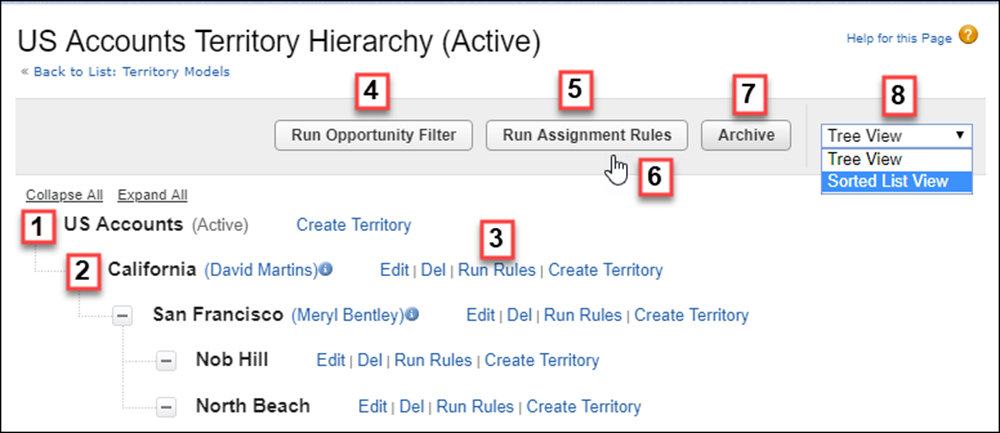
          Territory Hierarchy page in Setup

          The name and state of the territory model appear at the top node of the hierarchy (1). Parent and child territories are nested beneath the model name. If a territory has a forecast manager assigned, the manager’s name appears here (2). Create or edit child territories, or run their assignment rules (3).

          Run the filter that assigns territories to opportunities (4). Run assignment rules for all territories in the model (5). Hover to learn when rules were last run (6). Set the model’s state to Active or Archive (7). Toggle to a sorted list view and back to tree view (8).

           
          Loading
          Salesforce Help | Article