Plan territory models on a map using Territory Planning, an add-on product that
optimizes sales coverage and aligns teams with leadership goals. Assign records and users to
territories based on rules and criteria that you establish. Or automate assignments using other
methods that meet your requirements for distributing work equitably.
Required Editions
Available in: both Salesforce Classic (not available in all orgs) and Lightning
Experience
Available in: Enterprise, Performance, Unlimited, and
Developer Editions
Get an idea of what’s involved in planning and managing territories when you pair Territory
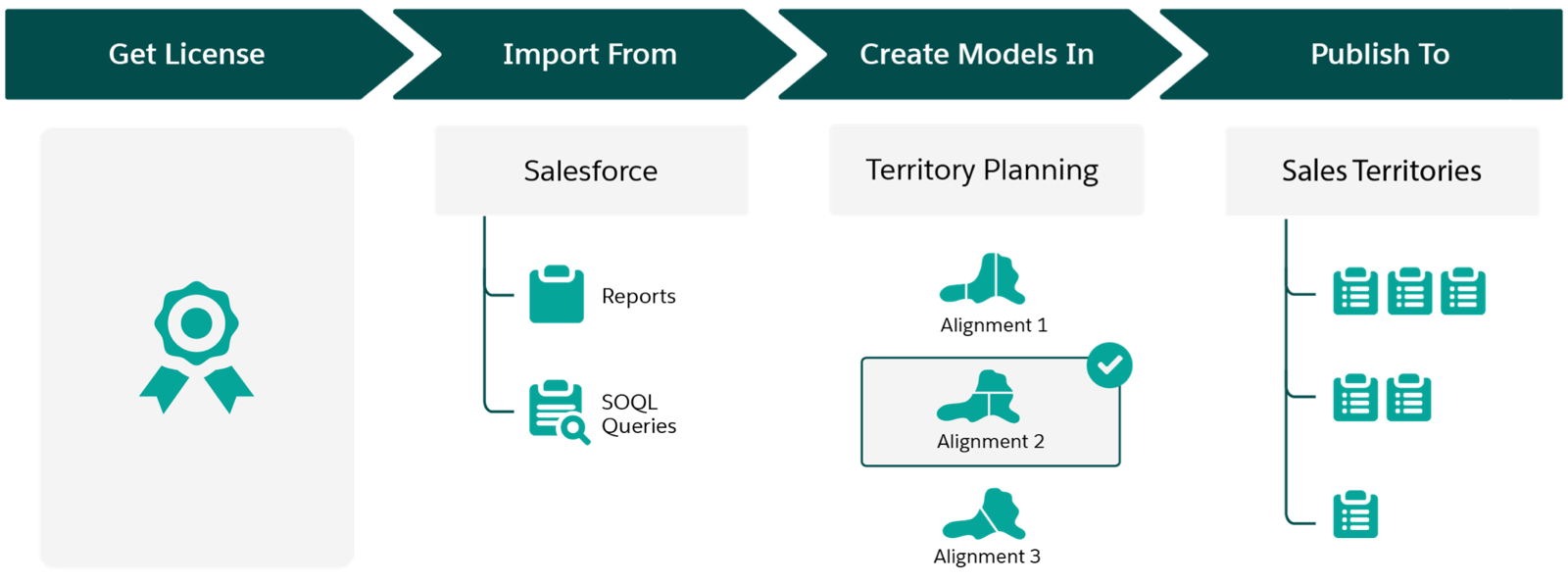
Planning with Sales Territories. After you get your Territory Planning license, design a
territory model and then publish it to Sales Territories. Here’s how.
High-Level Flow
How It Helps Your Business
Get a license for Territory Planning
Plan strategic territories aligned with leadership goals on a map with consideration to:
Geographic location
Equitable distributions of work based on rep performance
Visualizations for identifying boundaries, trends, and business patterns
Economic conditions, leadership changes, and product offerings
If you don’t have a license, discuss your options with your Salesforce account
executive.
Import data from Salesforce
Create models that include accounts, leads, and opportunities from Salesforce based on
your datasets from Territory Planning. Reports and queries gather the Salesforce data that
you specify for your planning efforts.
Import supplemental data from other sources using
CSV files that contain metrics, product details, or other relevant business data that helps
you plan with intention.
Create models in Territory Planning
Visualize how your optimized models:
Appear on a map
Compare with your other modeling scenarios
Result in balanced and equitable assignments
Contribute to your business’ sales goals
Import supplemental data into your scenarios from CSV files that contain any relevant
business data that helps with your analysis.
Publish models to Sales Territories
Apply your model throughout your sales hierarchy. That way, you:
Ensure that each rep accesses and focuses on only their individual areas of
responsibility
Fine-tune assignments using rules that you run periodically
Align your sales teams with your company’s leadership goals
Did this article solve your issue?
Let us know so we can improve!
Loading
Salesforce Help | Article
Cookie Consent Manager
General Information
Required Cookies
Functional Cookies
Advertising Cookies
General Information
We use three kinds of cookies on our websites: required, functional, and advertising. You can choose whether functional and advertising cookies apply. Click on the different cookie categories to find out more about each category and to change the default settings.
Privacy Statement
Required Cookies
Always Active
Required cookies are necessary for basic website functionality. Some examples include: session cookies needed to transmit the website, authentication cookies, and security cookies.
Functional Cookies
Functional cookies enhance functions, performance, and services on the website. Some examples include: cookies used to analyze site traffic, cookies used for market research, and cookies used to display advertising that is not directed to a particular individual.
Advertising Cookies
Advertising cookies track activity across websites in order to understand a viewer’s interests, and direct them specific marketing. Some examples include: cookies used for remarketing, or interest-based advertising.