
Loading
Feature degradation | Gmail Email delivery failureRead More
Sales Productivity
Table of Contents
Select Filters

          No results
          No results
          Here are some search tips

          Check the spelling of your keywords.
          Use more general search terms.
          Select fewer filters to broaden your search.

          Search all of Salesforce Help
          Organizing and Completing Your Tasks with the To Do List

          Organizing and Completing Your Tasks with the To Do List

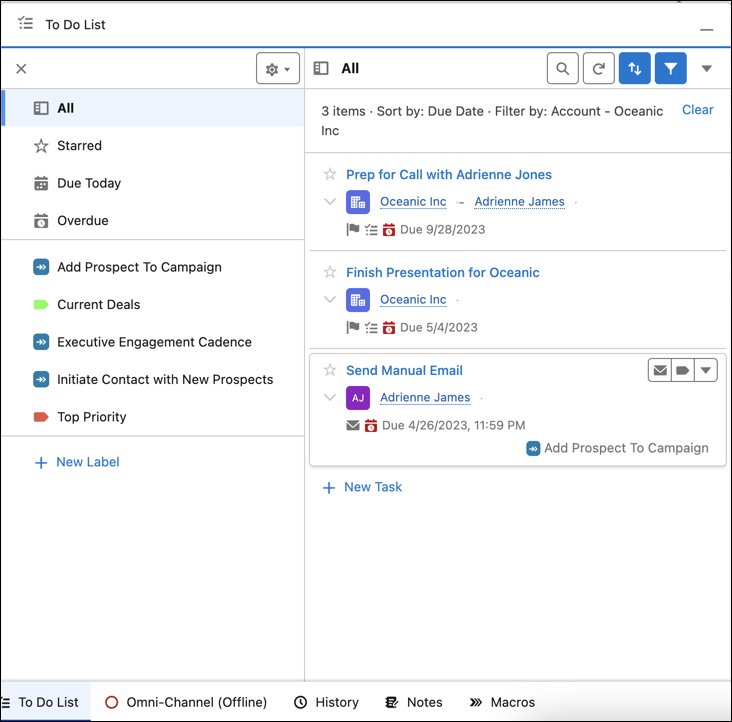
          The To Do List is the place to see, sort, and organize your tasks across accounts, contacts, cadences, and other records. Use colors and labels, such as Urgent or New Business, to help identify what to tackle first. Flag and sort tasks that are most important, or see what’s due today, or find tasks that were overlooked. Apply filters to further refine the view to see what needs your attention first.
          Required Editions

          Available in: Lightning Experience
          Available in: Professional, Enterprise, Unlimited, and Performance Editions

          These types of tasks are included in the To Do List.

          • Tasks
          • Tasks from cadences and quick cadences
          • Flow Orchestration work items

          The To Do List lets you work with your tasks in several ways.

          • Complete tasks directly from the To Do List.
          • Add custom labels to tasks.
          • Filter and group tasks by due date, label, cadence, and color.
          • Reorder tasks by dragging.
          • Search for specific items. Search doesn't include work items from flows.
          The To Do LIst

          Open the To Do List from the utility bar in the lower portion of the page.

          If you don’t see the To Do List in the utility bar, ask your Salesforce admin to add it.

           
          Loading
          Salesforce Help | Article