
You are here:
Monitor, Analyze, and Refine Bot Activity
To improve your bot, learn how to report on bot activity. Build standard reports using the Conversation Definition Sessions, Conversation Definition Dialog Daily Metrics, and Conversation Definition Hourly Dialog Metrics objects. To use CRM Analytics with Einstein Bots, download the Einstein Bots Value dashboard from AppExchange.
Required Editions
| View supported editions. |
| User Permissions Needed | |
|---|---|
| To build and manage Einstein Bots: | Customize Application OR Modify Metadata OR Manage Bots |
| To access analytics: | Use Analytics |
| To create, edit, and delete Analytics dashboards: | Create and Edit Analytics Dashboards |
| To create, edit, delete, and share Analytics applications: | Create Analytics Apps |
Reporting on bot activity is crucial to your team’s success. Business users want to understand key metrics such as average handle time or number of escalations so they can report the value that the bot adds to the team. Bot admins can create a better customer experience and improve bot performance by understanding conversation activity.
Bot Reporting Requirements and Limitations
Bot activity is automatically logged without sensitive information. In the event logs, Message, Input, and Output values are replaced with the phrase Sensitive data not available. To view all the data related to bot activity, enable Log Conversations on the Overview page in the Bot Builder.
For more information about bot data limitations, refer to Einstein Bots and Your Data.
Monitor and Optimize Bot Performance with Goals
Design bot conversations with a goal in mind and then use goals to fine-tune your dialogs. Add a goal to a dialog to track how often your customers reach a specific point in the conversation. Then go to the Goals page of the Bot Builder or run a standard report to monitor completed goal counts and other goal performance metrics. Learn more at Optimize Bot Performance with Goals
Use Einstein Bot Reports in Standard Reports
Report on all bots or a specific bot across date ranges and share insights with key stakeholders in minutes. Identify your customers’ most used dialogs and point out areas for improvement by reviewing exceptions, bot confusion, and transfers.
Reports include:
- All Bot Sessions Last 30 Days
- All Bot Sessions Today
- Confusion Frequency Last 30 Days
- Confusion Frequency Today
- Dialog Frequency Last 30 Days
- Dialog Frequency Today
- Dialogs with Exceptions Last 30 Days
- Dialogs with Exceptions Today
- Session Ended by Dialog Last 30 Days
- Session Ended by Dialog Today
Learn more at Navigate Einstein Bot Standard Reports.
You can create your own standard reports with key metrics using the Conversation Definition Sessions, Conversation Definition Dialog Daily Metrics, and Conversation Definition Hourly Dialog Metrics objects. To create a standard report, you must create a report type with the object before creating the report.
Export Bot Data
You can access bot data by using the API or the Data Loader. To export bot sessions or event logs, use the Conversation Definition Session, Conversation Event Log, or Conversation Definition Session Engagement objects using API version 49.0 or higher.
You can export any standard bot report as a formatted report. Or you can export the detail rows from any standard bot report in Excel or CSV format. From the report you want to export, click to expand the dropdown menu, and then select Export. Then choose your export view.
View Bot Event Logs in the Bot Builder
-
From the Bot Builder menu, click Performance.
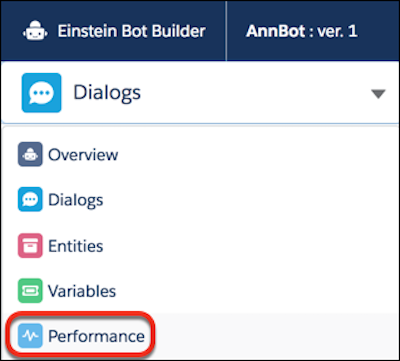
- Select the Events Log tab.
- Optimize Bot Performance with Goals
Design bot conversations with a goal in mind and then fine-tune your conversation design based on goal performance. Add a goal to track how often your customers reach a specific point in a dialog, such as when the bot returns a knowledge article, generates an order number, or files a case. Then monitor goal performance to identify areas for improvement and iterate on your bot. The more often your customers reach goals, the better your bot is meeting your customers’ needs. - Navigate Einstein Bot Standard Reports
Prebuilt reports make it easy to monitor bot performance, improve conversation design, and share information with key stakeholders. - View Bot Performance with CRM Analytics
Use the Einstein Bots Value managed package to quickly build and dig into reports and visualizations for bot business value, KPIs, and analytics. The dashboard uses your chat data and bot performance metrics, plus cost information specific to your organization (for example, cost per service rep per hour), to let you measure your bot’s value against your organization’s business objectives. - Troubleshoot Your Bot
Bots are an integrated product—they include Bot features, input from Chat and Messaging channels, and they work together with Apex and Flows. A great way to get started is to learn how to use the Event Logs to troubleshoot.
