
You are here:
Understand Context and System Variables
Access important information during bot conversations with context and system variables. Context variables let your bot gather customer information regardless of channel. System variables store back-end information about conversations.
Required Editions
| View supported editions. |
Context Variables
Context variables create dynamic mappings between Salesforce objects and the channel that your customer uses to interact with your bot. We provide prebuilt context variables that allow admins to look up contacts regardless of channel and then access any related objects. When combined with Chat, it consumes data from the prechat form to facilitate quick lookups.
For example, if the bot conversation uses Chat, the Contact Id is read from the LiveChatTranscript object. If the conversation uses Messaging, the Contact Id is read from the MessagingEndUser object tied to the MessagingSession object.
Bots can reference multiple objects in Salesforce to determine who your customer is. If a Contact Id exists, you can use the Contact Id context variable with a flow or Apex. This method outputs the Contact First Name, Last Name, and any other field.
Context variables are read-only.
Salesforce provides these prebuilt context variables:
- Routable Id: If you’re using a pre-chat form, use Routable Id to access the LiveChatTranscript record for the current bot session. From there, you can look up the Contact Id and Lead Id fields.
- Chat Key: The session ID of the chat transcript. Use the Chat Key to reference an order or a case, access custom fields created on the chat transcript record, and pass information to Apex or a flow.
- Contact Id: Use the Contact Id to find out when the chatting customer is a known contact.
- With Messaging, the ContactId context variable in Bot Builder is filled if a service rep has previously linked the Messaging User and Contact. This variable is tied to the MessagingEndUser.ContactId field. The link is made when a service rep receives a link notification or through Channel-Object Linking. The ContactId variable is null the first time a chatting customer contacts a service rep, or for the returning Messaging user who has only encountered a bot.
- End User Id: In the Bot Builder, use the End User Id to find information about the customer chatting with your bot. In Apex or a flow, use the End User Id to look up the customer’s Contact Id
The provided context variables map to these channel objects:
| Label | API Name | Data Type | Chat Channel Field Mapping | Chat Omni-Channel Field Mapping | Messaging Channel Field Mapping |
|---|---|---|---|---|---|
| Chat Key | ChatKey | Text | LiveChatTranscript.ChatKey | LiveChatTranscript.ChatKey | Not applicable |
| Contact Id | ContactId | ID | LiveChatTranscript.ContactId | LiveChatTranscript.ContactId | MessagingEndUser.ContactId |
| End User Id | EndUserId | ID | Not applicable | LiveChatTranscript.LiveChatVisitorId | MessagingSession.MessagingEndUserId |
| Routable Id | RoutableId | ID | Not applicable | LiveChatTranscript.Id | MessagingSession.Id |
Context variables are identified with a [Context] tag before the variable name. You can use context variables as inputs for dialog actions.
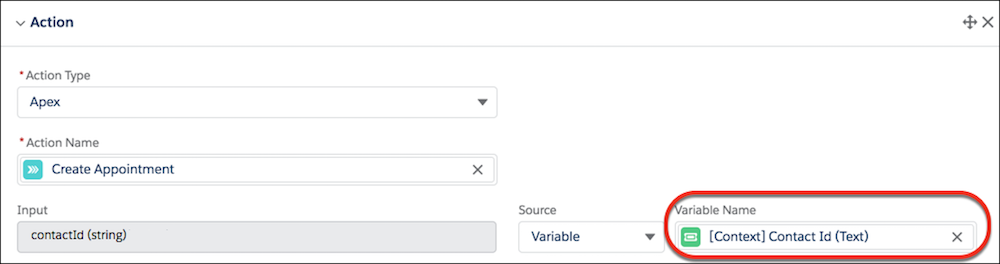
Custom Context Variables
Custom context variables help the bot use the information it learns throughout a conversation. You can map custom context variables to custom fields on a prechat form to customize the conversation, or use the incoming Messaging phone number to look up a contact.
Custom context variables can be linked to multiple channels and objects. The Chat channel can map to the LiveChatTranscript object and the Messaging Channels can map from either the MessagingSession or MessagingUser objects.
To create custom context variables see Create Custom Context Variables.
System Variables
Salesforce provides these system variables:
- Referrer Bot Id: In bot-to-bot transfers, this field shows the ID of the bot that initiated the transfer.
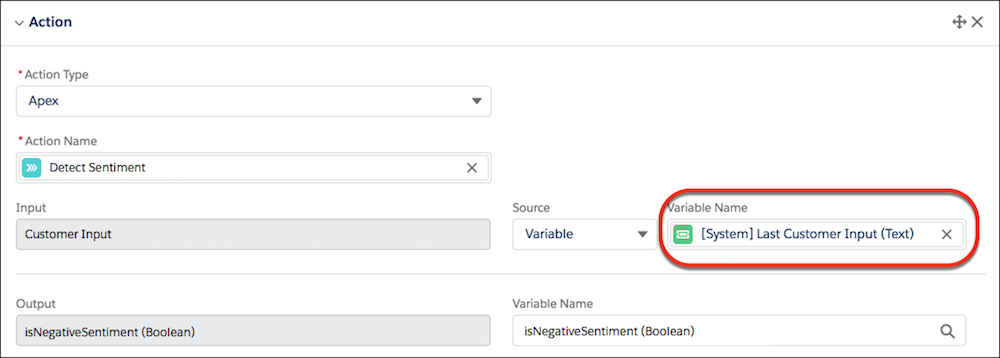
- Last Customer Input: The string of text the customer input most recently. This field
populates only when a customer inputs text, and not when a customer selects a static or dynamic choice response. To
capture the last customer input, use the Last Customer Input system variable in a dialog
action. You can then pass it to Apex for further processing such as sentiment analysis.
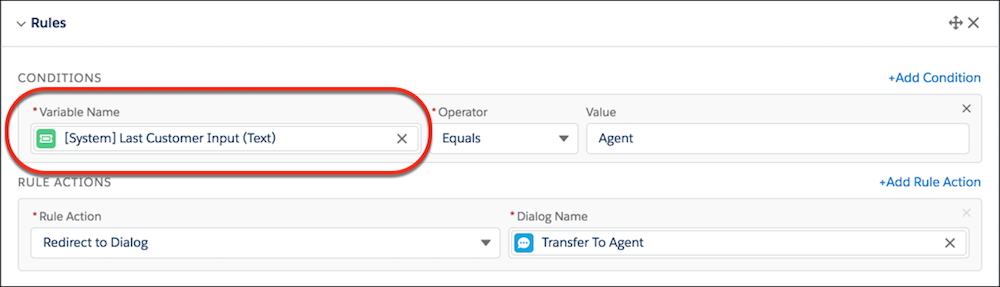
You can also use the Last Customer Input system variable in dialog rule conditions.
Context and System Variables in Merge Fields
Like other Einstein Bot variables, you can use context and system variables in bot messages with merge syntax.
- To call a custom fields, use the Field Name and append
__cat the end. For example,{!CustomField__c}. - To call a specific record, use
{!Record.Field}. - To call an item in a list variable, use
FieldName[X], with X referring to the location of the item in the list. Since Einstein Bots uses a zero-based index with list variables, the first item of the list isFieldName[0].
{!$System.LastCustomerInput}
{!$Context.ContactId}
{!VariableName}
- Create Custom Context Variables
Context variables for the contact are included, but you can create any type of context variable to use in your bot implementation. Use context variables for product names, store locations, referral URLs, or items in a customer’s shopping cart.
