
You are here:
Engaged Sessions, Bot Billing, and Bot Performance
Use engaged sessions to track your bot use against your monthly subscription allowance and measure bot performance.
Required Editions
| View supported editions for Einstein Bots. |
| View supported editions for Messaging. |
Einstein Bots uses engaged sessions to differentiate between conversations with and without two-way interaction between your customer and your bot. An engaged session is any bot conversation where your customer sends at least one message or selects at least one menu option or choice other than the End Chat button.
All sessions on third-party channels (for example, SMS or Facebook Messenger) count as engaged sessions because a bot conversation is always initiated by your customer.
On all channels, bot-to-bot and agent-to-bot transfers count as a single engaged session. For example, when Bot A transfers the conversation to Bot B, it counts as a single engaged session against Bot A. When Agent A transfers the conversation to Bot A, it counts as a single engaged session against Bot A.
Bot Billing

Salesforce has the right to terminate your access to Einstein Bots if there is any unauthorized use.
For billing purposes, one engaged session equals one bot conversation. Only engaged sessions count against your monthly subscription allowance. A session in which your customer ends the conversation before interacting with the bot isn’t counted as an engaged session and doesn’t count against your allowance.
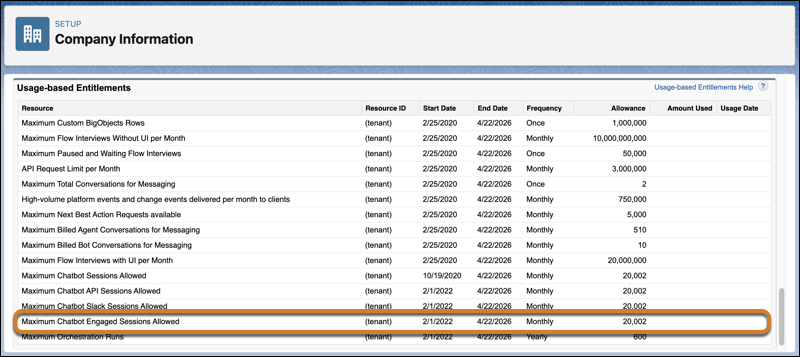
To track your bot use against your monthly subscription allowance, view your engaged session count in Usage-based Entitlements. From Setup, enter Company Information in the Quick Find box, then select Company Information. In the Usage-based Entitlements section, find the Maximum Chatbot Engaged Sessions Allowed resource.
Bot Performance
Dig into how your customers are using your bot with engaged session metric types and reports. We provide several prebuilt standard reports that give you insight into how often customers are engaging with your bot, the average length of time customers spend talking to your bot, and more. Learn more in Salesforce Help for Einstein Bot standard bot reports.
