Add an action from a registered external service in Bot Builder to allow your bot to
send and receive data between Salesforce and external API providers. Deliver personalized
customer experiences without writing a single line of code.
Before you begin, make sure that the external service you want to integrate with your
dialog is registered in your Salesforce org. If not, register the external service. To
register an external service, you must have the Customize Application user permission.
From the Dialog Component Library, drag the External Service
Action step onto the canvas.
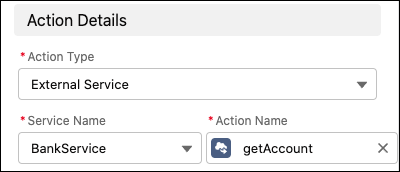
In the Step Properties panel, select the name of the external service associated with
your desired action, and then select the action.
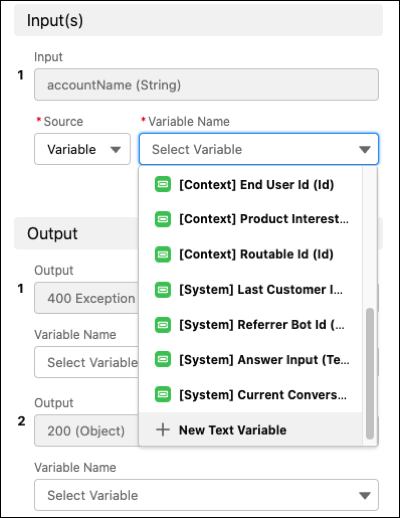
Specify input and output variables.
These variables are supported:
Text
Number
Boolean
Object
Date
DateTime
Currency
Id
A single-level list (in other words, a collection of variables of the same type,
such as a list of text values)
Bot Builder doesn’t support map inputs or nested lists (in other words, lists of
lists).
Save the dialog.
When an external service action is used in a bot dialog, you can’t edit the settings
for the associated service or delete the service from your Salesforce org—even when a bot is
inactive. To edit or delete an external service, confirm that it’s not included in any bot
dialogs. If you try to edit or delete a service that’s used in a bot dialog, you receive an
error message and your changes aren’t saved.
We use three kinds of cookies on our websites: required, functional, and advertising. You can choose whether functional and advertising cookies apply. Click on the different cookie categories to find out more about each category and to change the default settings.
Privacy Statement
Required Cookies
Always Active
Required cookies are necessary for basic website functionality. Some examples include: session cookies needed to transmit the website, authentication cookies, and security cookies.
Functional Cookies
Functional cookies enhance functions, performance, and services on the website. Some examples include: cookies used to analyze site traffic, cookies used for market research, and cookies used to display advertising that is not directed to a particular individual.
Advertising Cookies
Advertising cookies track activity across websites in order to understand a viewer’s interests, and direct them specific marketing. Some examples include: cookies used for remarketing, or interest-based advertising.