
You are here:
Define Languages for Your Einstein Bot
Your global customers expect your bots to understand their native language. To know what your customers are saying, your bots must know how a language works. Bots use natural language understanding (NLU) and named entity recognition (NER) to understand language and local details such as dates, currency, or number formatting. Einstein Bots that use a specific language can better understand the customer and route them to the correct dialog.
Required Editions
| View supported editions. |
You can build Einstein Bots for one language or multiple languages. You must define at least one primary language for each Einstein Bot on the Bot Overview page. See Set or Update a Bot Primary Language and Add or Remove a Secondary Bot Language.
To view and edit language-specific data in the Bot Builder, you must enable the language in Language Settings, activate it in Translation Workbench, and add it to Conversation Languages on the Bot Overview page. Then you can add or edit dialog translations on the Dialog Translations tab. To quickly translate a dialog to a different language, select dialog steps, and then click Translate Selected.
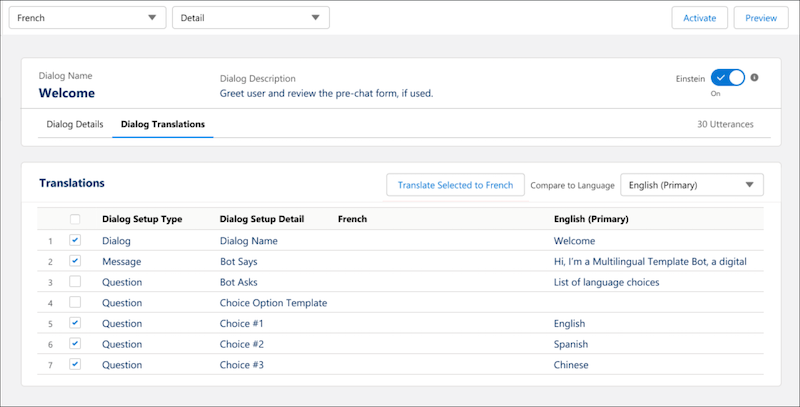
Multi-language bots share dialog logic and deliver dialog translations to your end user. To show language choices at the beginning of the conversation so the end user can select their conversation language, create a question dialog step that offers each language as a static choice. See Set a Bot Conversation Language.
To ensure that a bot respects rule conditions in multiple languages, on Rule dialog steps, use the OR condition requirements to specify text value conditions in each language.
Multi-language bots have one F1 score on the Model Management page. You can download the data and filter metrics by language.
In multi-language bots, dialogs assigned to the Bot Options Menu only show in the primary language.
Some bot templates and blocks support multiple languages. For more details on language support for a system template, see Explore Einstein Bot System Templates.
Supported Languages
Einstein Bots supports right-to-left languages in the Bot Builder based on the language you specify in your personal settings.
To access all of the languages that Einstein Bots supports, see Salesforce supported languages. Where necessary, enable end-user and platform-only languages on the Language Settings page in Setup.
Languages that are supported by the original intent model must have at least 20 or 50 utterances per intent.
For some languages, named entity recognition (NER) is partially supported only for phone number and currency.
- Phone numbers are recognized only when numbers are written in Arabic numerals (0-9).
- Currency is recognized only when the currency code is written in English letters (A-Z) and the numbers are written in Arabic numerals (0-9). Some languages recognize English currency names with or without the currency code (dinar, euro, rial, riyal, rupee).

Support for some languages in Einstein Bots is a Beta Service. Customer may opt to try such Beta Service in its sole discretion. Any use of the Beta Service is subject to the applicable Beta Services Terms provided at Agreements and Terms.
- Set or Update a Bot Primary Language
Every Einstein Bot requires a primary language to be able to understand your end users. Defining a bot primary language helps with natural language processing (NLP) and named entity recognition (NER). - Add or Remove a Secondary Bot Language
Create secondary languages to your existing bots. - Manage Secondary Language Translations
Edit bot translations directly in each bot dialog. - Set a Bot Conversation Language
You can easily define a bot conversation language at the beginning of the conversation. End users can then select their preferred language and switch to the translated text. You can also set the preferred language variable using browser information or based on a URL.
