Evaluate How Well Your Bots Understand Your Customers
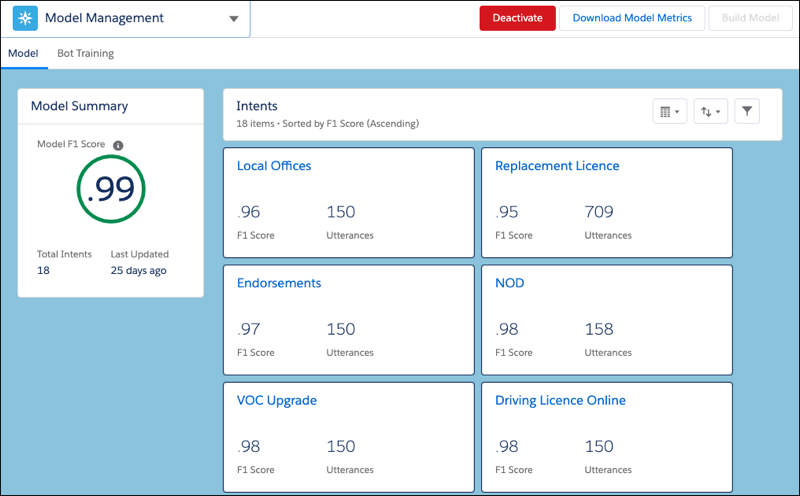
The Model Management page shows metrics on the quality of your bot’s intent model and
individual intent details. Use the information to fine-tune intents and improve how well your
bot understands your customers.
Your bot is only as good as the data that you feed it. To ensure Bot quality, we
recommend visiting the Model Management menu often. Our models rate intents based on an F1
Score, which is a statistical term that shows how accurate the model is at predicting
correctly.
The F1 score is defined from 0 through 1, with 1 being the highest possible
score. The higher your intent’s F1 score, the more likely that the bot predicts correctly
every time it has a conversation. F1 scores combine two metrics:
Precision—the number of correct positive results divided by the number of total positive
results
Recall—the number of positive results divided by the number of total expected
results
To improve your intent’s F1 score, we provided recommendations on the Model Management
Page.
Note If your model pre-dates the F1 score integration in Einstein Bots, the model
requires a rebuild to integrate your data into the new score. In that case, a prompt
indicates the need for a rebuild.
From the Bot Builder menu, click Model Management.
To view intent model metrics, display the Model tab.
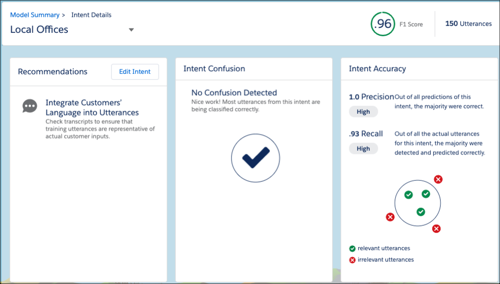
To view the recommendations, click an intent name.
Adding utterances and clarifying intents are great ways to improve F1 scores. It’s also
important to frequently integrate new customer data from conversation transcripts to
keep the bot current. A minimum of 20 utterances is required to build the model, but
more utterances make the model more accurate.
To act on the recommendations provided, click Edit Intent to go
to the intent details for that dialog.
To visualize the accuracy of your intent model, you can use the Einstein Intent Assessor AppExchange tool.
To view model performance in other languages, click Download Model
Metrics. Bots with multiple languages have both aggregated metrics and
language-specific metrics.
Did this article solve your issue?
Let us know so we can improve!
Loading
Salesforce Help | Article
Cookie Consent Manager
General Information
Required Cookies
Functional Cookies
Advertising Cookies
General Information
We use three kinds of cookies on our websites: required, functional, and advertising. You can choose whether functional and advertising cookies apply. Click on the different cookie categories to find out more about each category and to change the default settings.
Privacy Statement
Required Cookies
Always Active
Required cookies are necessary for basic website functionality. Some examples include: session cookies needed to transmit the website, authentication cookies, and security cookies.
Functional Cookies
Functional cookies enhance functions, performance, and services on the website. Some examples include: cookies used to analyze site traffic, cookies used for market research, and cookies used to display advertising that is not directed to a particular individual.
Advertising Cookies
Advertising cookies track activity across websites in order to understand a viewer’s interests, and direct them specific marketing. Some examples include: cookies used for remarketing, or interest-based advertising.