You are here:
Transfer Bot Conversations to Another Bot
Create custom solutions in your org by adopting a multi-bot strategy. Use dialog Rule steps to transfer bot conversations to another bot.
Required Editions
| View supported editions. |
| User Permissions Needed | |
|---|---|
| To build and manage Einstein Bots: | Customize Application OR Modify Metadata OR Manage Bots |
Bot-to-bot transfers between standard and enhanced bots aren’t supported. Both bots in a bot-to-bot transfer must be of the same type.
When you create multiple bots, you can transfer conversations from one bot to another. Some businesses build bots based on function. For example, one bot starts the interaction and then transfers the conversation to a sales or service bot based on customer input. Other businesses build bots based on customer location or language. When a bot transfers the conversation to another bot, each conversation is counted as a unique conversation.
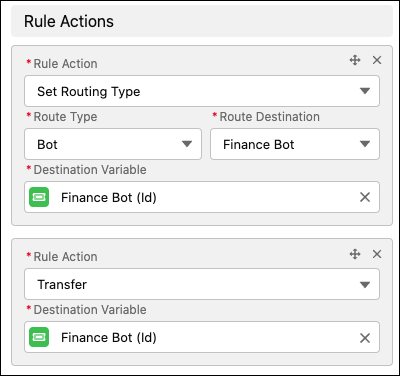
To transfer a conversation to another bot, start with two bots: the source bot and the destination bot. Create an ID variable to define the destination bot. Then use a Rule dialog step with the same bot ID variable to initiate the transfer.
-
Create an ID variable to define the destination bot.
- In the Bot Builder menu, select Variables.
- Click New.
- For the Data Type, select ID. For the SObject Type, select Bot.
- Click Save.
- From the Dialog Component Library, drag the Set Routing Type onto the canvas.
- In the Step Properties panel, in the Route Type field, select Bot. In the Route Source field, select the destination bot. In the Destination Variable field, select the ID variable that you created.
- Click Add Rule Action.
- In the Rule Action field, select Transfer. In the Destination Variable field, select the ID variable set in the previous step.
-
Save the dialog.