Einstein Bots are team players. They’re great at passing conversations to the team
member that is most likely to solve a customer issue. Whether you program your bot to transfer
to a service rep or to another bot, the following steps show you the best way to set up bot
conversation transfers.
Use the Transfer to Agent System Dialog to Transfer Conversations
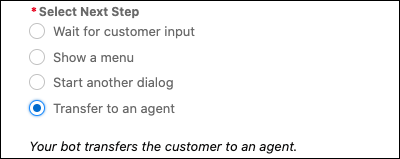
You can transfer conversations to a service rep in the queue attached to the deployment or
connection defined on the Overview page by pointing to the Transfer to Agent dialog. Select
Transfer to an agent in the Next Step section. If you set any other
transfer dialog steps, the bot ignores the Next Step and uses the dialog step instructions
instead.
Use a Dialog Rule Step to Transfer Conversations
You can also use Rule
dialog steps to transfer conversations to a specific queue or to another bot.
Transfer Bot Conversations to a Queue You can route bot conversations to a queue of service reps by using Rule dialog steps. And you can help customers who initiate a transfer when service reps are offline with the No Available Agents dialog.
Transfer Bot Conversations to Another Bot Create custom solutions in your org by adopting a multi-bot strategy. Use dialog Rule steps to transfer bot conversations to another bot.
Use Skills-Based Routing to Transfer Bot Conversations Increase customer satisfaction with skills-based service rep routing and bots. Now you can route work items to service reps that can best serve customer needs based on skills like language or technical expertise. Skills-based routing makes bots the first point of customer contact. The bot identifies the required skills then transfers the customer to the next available service rep that matches their needs. Skills-based routing works the same across all channels.
Did this article solve your issue?
Let us know so we can improve!
Loading
Salesforce Help | Article
Cookie Consent Manager
General Information
Required Cookies
Functional Cookies
Advertising Cookies
General Information
We use three kinds of cookies on our websites: required, functional, and advertising. You can choose whether functional and advertising cookies apply. Click on the different cookie categories to find out more about each category and to change the default settings.
Privacy Statement
Required Cookies
Always Active
Required cookies are necessary for basic website functionality. Some examples include: session cookies needed to transmit the website, authentication cookies, and security cookies.
Functional Cookies
Functional cookies enhance functions, performance, and services on the website. Some examples include: cookies used to analyze site traffic, cookies used for market research, and cookies used to display advertising that is not directed to a particular individual.
Advertising Cookies
Advertising cookies track activity across websites in order to understand a viewer’s interests, and direct them specific marketing. Some examples include: cookies used for remarketing, or interest-based advertising.