
You are here:
What’s an Entity?
An entity represents a type of data that you want to collect from a customer. We provide the following system entities: Boolean, Currency, Date, DateTime, Email Address, Number, Object (standard or custom), Phone Number, and Text.
Required Editions
| View supported editions. |
Restricting the type of data that can be input into a field is crucial for data integrity. In Salesforce objects, fields are defined by an included Field Type, which describes the type of data that’s stored inside the field. In Einstein Bots, the Data Type and the Field are separated into an entity and a variable. Entities store the type of data that you want to store and can be shared across multiple variables or versions of the same bot.
When you use a Question element to gather information from a customer, you specify the entity to look for in the customer input. You also specify a variable to store the information that the bot finds. The bot examines the customer input for the entity that you specify, and then stores the information in the variable that you specify.
System Entities and Custom Entities
Einstein Bots includes system entities, which are defined by the data type. They’re intentionally generic so that you can reuse them frequently across your bot. For example, the Text system entity accepts all text that the customer inputs in response to a question.
To make your variable more specific, you can create custom entities to further define the data stored. Custom entities can have the data type of Text, Number, Boolean, Date, DateTime, or Currency.
Entities and Conversation Repair
Entity extraction is helpful when used with Conversation Repair. If a customer response doesn’t match the entity format, you can provide extra messages to help the customer correct the formatting.

Boolean Entities
Boolean Entities define yes or no answers. When selected, bots look for words, emoji, or phrases that commonly refer to either yes or no. You can include static choices to encourage the end user to pick one, but if they type instead, the bot filters that text through the boolean entity parameter.
If the bot can’t identify yes or no from the input, the text is categorized as a neutral response.
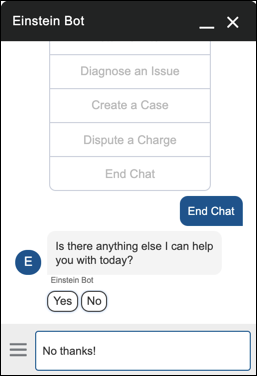
Boolean entities support the same languages as Einstein Bots, but English is the only language that’s generally available. All other languages are supported in beta. Learn more about supported languages at Define Languages for Your Einstein Bot. Einstein Bots also support emoji responses.
Custom Text Entities
You can create custom text entities to enforce patterns of text or categorize synonyms of the same word as one value. To add a Regex pattern to your entity, use the Pattern Extraction Type. Use the Value Extraction Type to set values and their alternates.
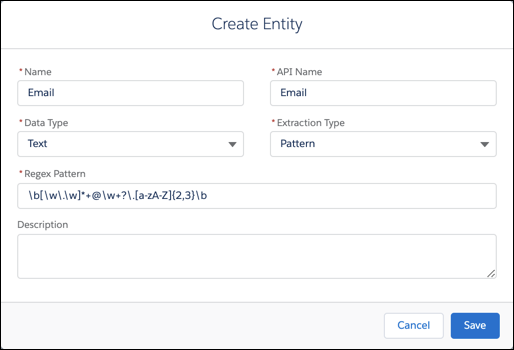
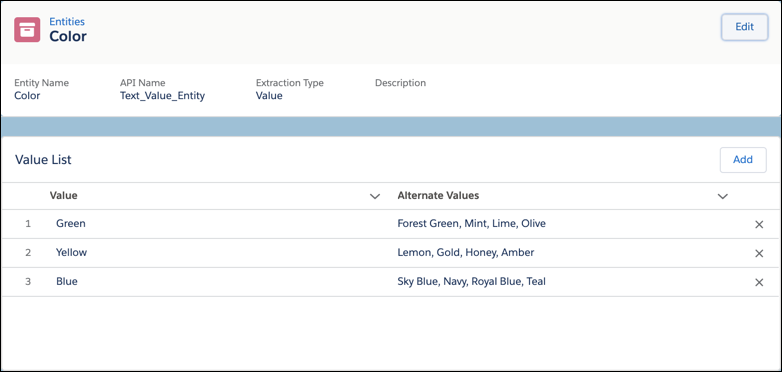
- Add a Custom Entity
Create custom entities to gather information that matches a regex pattern or list of synonym values. - Add a Value List Entity
A value list entity provides a way to extract the entity if there’s an exact match to a value or a synonym in a list of values.
