Show Service Reps and Supervisors Midconversation Summaries
When a service rep or supervisor joins an active voice call or messaging session and
has to gain context quickly, catch them up with a real-time AI-generated summary of the
conversation.
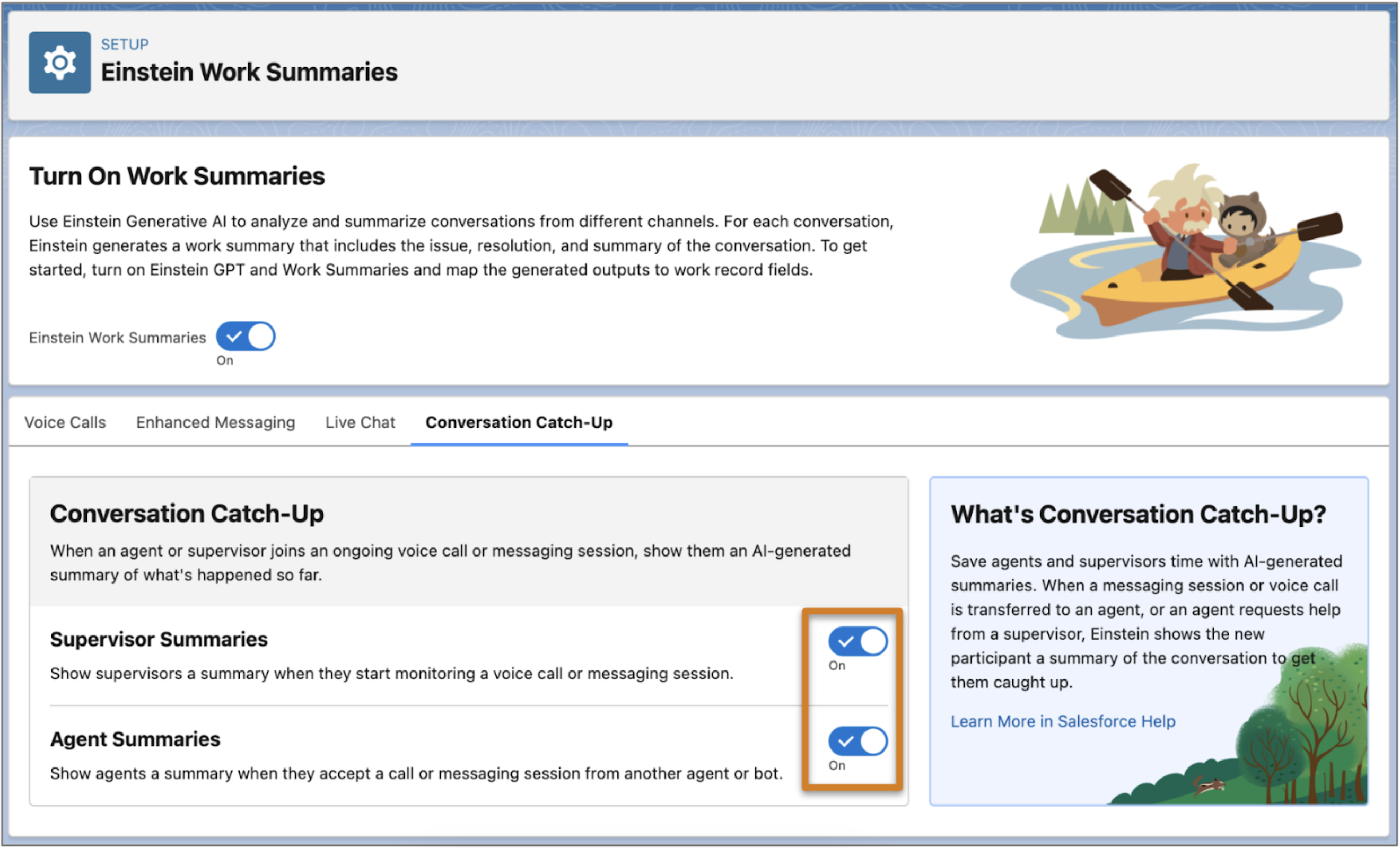
From Setup, in the Quick Find box, enter Work Summaries, and then
select Einstein Work Summaries.
If it’s not already on, turn on Einstein Work Summaries.
Click the Conversation Catch-Up tab.
To show conversation summaries to supervisors when they start monitoring a voice call or
messaging session, turn on Supervisor Summaries.
To show conversation summaries to service reps when a voice call or messaging session
is transferred to them from another service rep or bot, turn on Agent
Summaries.
A conversation must have at least 10 text-based entries before a summary can be
generated. These entries don’t include menus from bots, menu selections from the customer,
auto-responses, or other rich content that might be sent as part of the
conversation.
Conversation Catch-Up summaries can be translated if Agent Translation is enabled. When
Agent Translation is enabled, the Conversation Catch-Up summary is generated in the
transcript language, not in the configured language. Conversation Catch-Up is available in
ten languages: Brazilian Portugese, Dutch, English, French, German, Italian, Japanese,
Mexican Spanish, Portuguese, Spanish, and Swedish.
Did this article solve your issue?
Let us know so we can improve!
Loading
Salesforce Help | Article
Cookie Consent Manager
General Information
Required Cookies
Functional Cookies
Advertising Cookies
General Information
We use three kinds of cookies on our websites: required, functional, and advertising. You can choose whether functional and advertising cookies apply. Click on the different cookie categories to find out more about each category and to change the default settings.
Privacy Statement
Required Cookies
Always Active
Required cookies are necessary for basic website functionality. Some examples include: session cookies needed to transmit the website, authentication cookies, and security cookies.
Functional Cookies
Functional cookies enhance functions, performance, and services on the website. Some examples include: cookies used to analyze site traffic, cookies used for market research, and cookies used to display advertising that is not directed to a particular individual.
Advertising Cookies
Advertising cookies track activity across websites in order to understand a viewer’s interests, and direct them specific marketing. Some examples include: cookies used for remarketing, or interest-based advertising.