Use
Einstein Classification Apps in the Service Console
Einstein Case Classification and Einstein Case Wrap-Up help you fill in fields on cases
by recommending or selecting field values based on similar closed cases. Simply view, select,
and save recommendations from the Lightning Service Console.
To view and act on Einstein Case Classification recommendations:
Einstein Case Classification User permission set
To view and act on Einstein Case Wrap-Up recommendations:
Einstein Case Wrap-Up User permission set
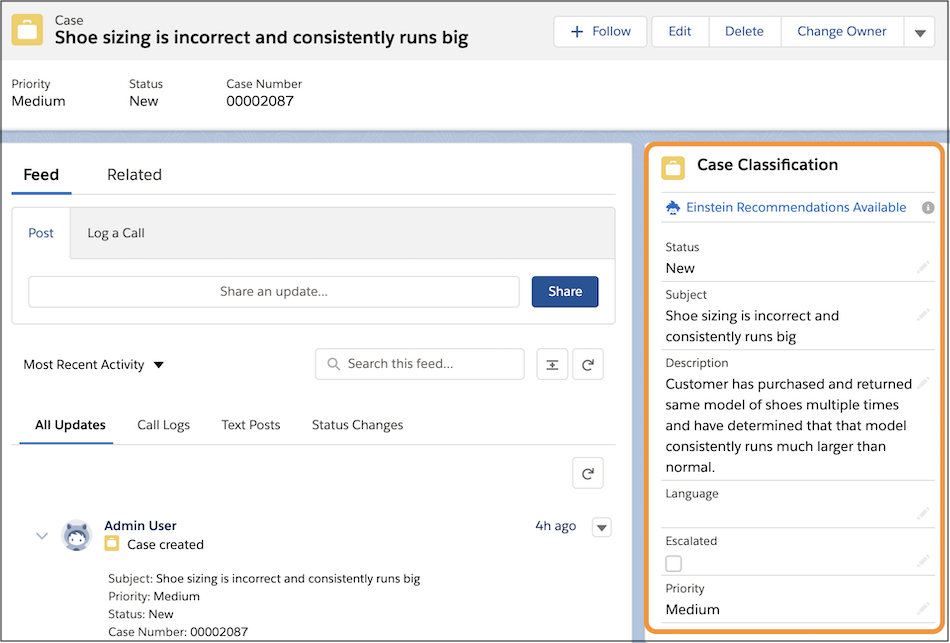
View recommendations in Einstein Case Classification component, or the Einstein
Case Wrap-Up component, in the Lightning Service Console. If you’re using Einstein Case
Classification in Salesforce Classic, recommendations appear in the Case Classification
sidebar.
To view Einstein’s recommendations, refreshing the page is sometimes
required.
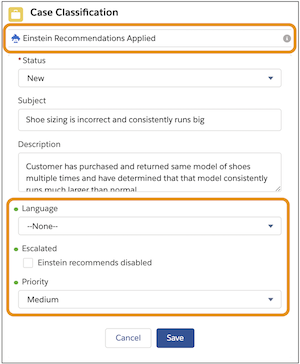
For Case Classification, Einstein makes recommendations immediately after
the case is created. To select Einstein’s predictions, click Einstein
Recommendations Available. Fields with recommendations appear with a green
dot, and the text at the top of the component changes to Einstein Recommendations Applied.
For Einstein Case Wrap-Up, chat service reps see recommendations on-demand or when the chat
conversation ends. To see Einstein’s predictions, service reps click Get Einstein
Recommendations in the Einstein Field Recommendations Lightning component. A
green dot marks fields with predictions. For Case Wrap-Up, Einstein only considers
information from LiveChatTranscripts and Case when making recommendations.
For Case Classification and Case Wrap-Up, recommendations are shown
on:
Checkboxes: Text next to the field says Einstein recommends disabled or Einstein
recommends enabled.
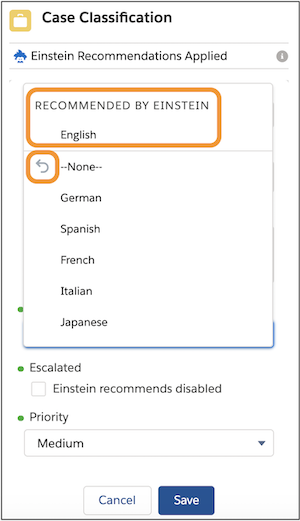
Picklists and lookup fields: If the recommended value is selected, the word Best appears
next to the value. If not, click into the field to see which value Einstein recommends.
The gray arrow shows the current value.
The recommended value is shown with the text Recommended by Einstein. Up to three
recommended values are shown, with the most likely value listed first.
After you review the recommendations, save your changes.
We use three kinds of cookies on our websites: required, functional, and advertising. You can choose whether functional and advertising cookies apply. Click on the different cookie categories to find out more about each category and to change the default settings.
Privacy Statement
Required Cookies
Always Active
Required cookies are necessary for basic website functionality. Some examples include: session cookies needed to transmit the website, authentication cookies, and security cookies.
Functional Cookies
Functional cookies enhance functions, performance, and services on the website. Some examples include: cookies used to analyze site traffic, cookies used for market research, and cookies used to display advertising that is not directed to a particular individual.
Advertising Cookies
Advertising cookies track activity across websites in order to understand a viewer’s interests, and direct them specific marketing. Some examples include: cookies used for remarketing, or interest-based advertising.