
You are here:
Update Your Einstein Classification Model
Update an active Einstein classification model to add or remove fields, change which cases it applies to, or adjust field prediction settings.
Required Editions
| View supported editions. |
| User Permissions Needed | |
|---|---|
| To build and manage Einstein Case Classification and Einstein Case Wrap-Up: | View Setup AND Customize Application AND Manage Profiles and Permission Sets AND Edit on cases OR Modify All Data |
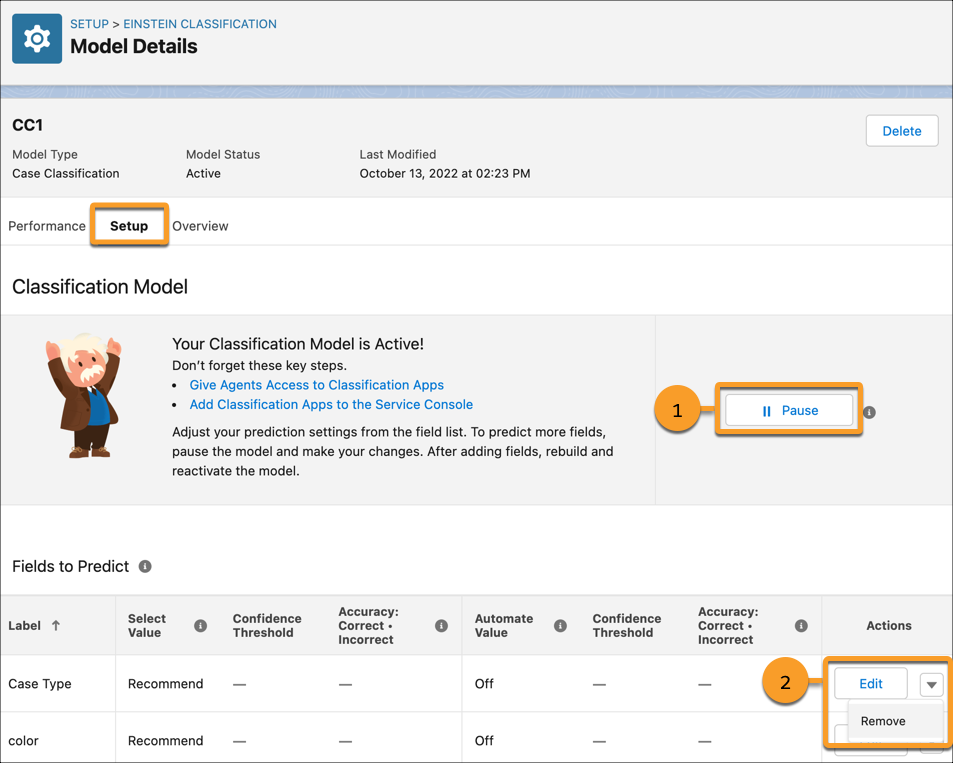
| to... | Follow these steps |
|---|---|
| Pause and reactivate predictions. |
|
| Turn on predictions for a new field. |
|
| Turn off predictions for a field. |
If a model has only one field, removing the field deletes the model. If a model has multiple fields, removing one deactivates the model. |
| Change a field’s prediction settings. | |
| Change which cases receive predictions or which cases Einstein learns from. | Einstein makes predictions only on cases that match your model’s segment criteria. If you don’t define a segment, Einstein makes predictions on all new cases. Defining example cases doesn’t affect which cases get predictions.
|
Did this article solve your issue?
Let us know so we can improve!
