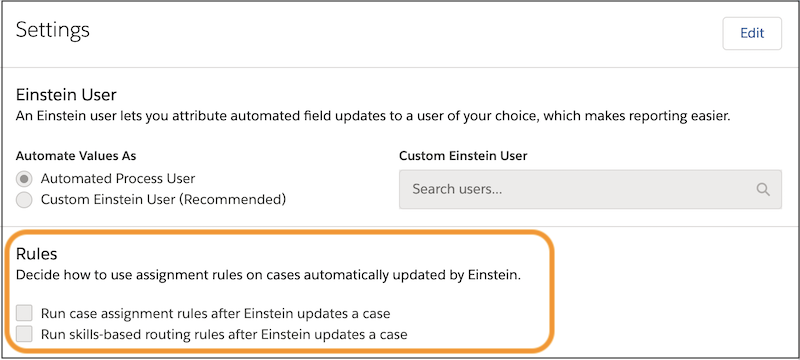
Run Assignment Rules for Einstein Case Classification
When Einstein Case Classification automatically saves predicted field values to a case,
Einstein Case Routing can use your existing case routing logic to route the case to the right
service rep. You need the Service Cloud Einstein add-on license to use Einstein Case
Routing.
If your org uses both case assignment rules and skills-based routing rules, you can
select both options. Make sure that the rules are mutually exclusive.
If Automate Value is turned on for a field in your model, Einstein Case Classification
automatically updates the case field when the prediction meets your confidence threshold. When
a case is updated in these circumstances, Einstein Case Routing then runs the routing rules
that you’ve selected on the Einstein Classification Setup page. If you don’t select a rule
option, Einstein doesn’t route the case.
Example Suppose you select the option to run case assignment rules for Einstein Case
Classification. You turn on Automate Value for the Reason field and set the confidence
threshold to 90. When a new case is created, Einstein analyzes it and predicts the case reason
with 93% confidence. Since the prediction’s confidence is above the field’s threshold,
Einstein updates the Reason field and saves the case. Einstein then runs your existing case
assignment rules on the newly updated case.
If you use any other logic for your queue-based or skills-based routing, or you have an
external routing implementation, use platform events to subscribe to AIUpdateRecordEvent. After you get notified of Einstein’s changes through
AIUpdateRecordEvent, rerun your routing logic.
We use three kinds of cookies on our websites: required, functional, and advertising. You can choose whether functional and advertising cookies apply. Click on the different cookie categories to find out more about each category and to change the default settings.
Privacy Statement
Required Cookies
Always Active
Required cookies are necessary for basic website functionality. Some examples include: session cookies needed to transmit the website, authentication cookies, and security cookies.
Functional Cookies
Functional cookies enhance functions, performance, and services on the website. Some examples include: cookies used to analyze site traffic, cookies used for market research, and cookies used to display advertising that is not directed to a particular individual.
Advertising Cookies
Advertising cookies track activity across websites in order to understand a viewer’s interests, and direct them specific marketing. Some examples include: cookies used for remarketing, or interest-based advertising.