
You are here:
Autofill Case Fields with Einstein Case Classification Apps
With Einstein Case Classification and Einstein Case Wrap-Up, remove the guesswork from completing case fields and resolve cases quickly and consistently.
Required Editions
| View supported editions. |
When you enable Einstein classification apps—Einstein Case Classification (1) and Einstein Case Wrap-Up (2)—your service reps can see Einstein’s predictions at both ends of the case lifecycle: when a case is created and when a chat with the customer ends. To set up one or both apps, create a model that tells Einstein what closed cases to learn from. Einstein can then predict field values for most checkbox, picklist, and lookup fields on a case. Your service reps see Einstein’s recommendations in the Service Console.
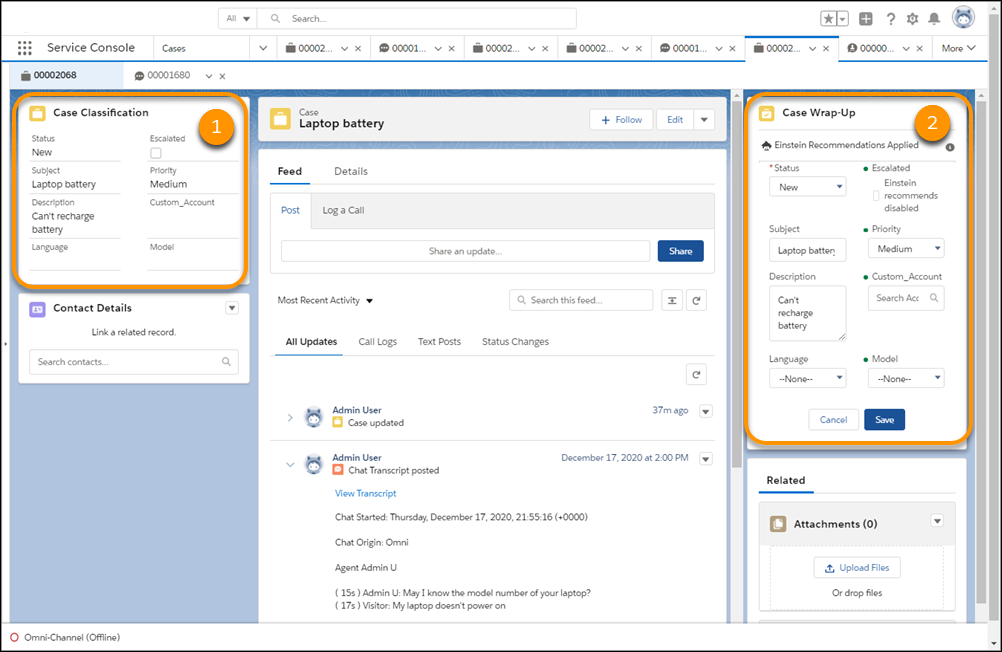
To get started, explore the Try Einstein version of the classification apps, which lets you build one model for each app. The Einstein for Service add-on license provides the full version that lets you create five models per app. That way, you can customize models for different parts of your business. The add-on license also lets Einstein Case Classification automate field completion and optionally route cases.
- Einstein Classification Key Concepts
Explore case classification key concepts including models, segments and examples cases, case automation, and case routing. - Prepare for Einstein Classification Apps
Before you set up Einstein classification apps, review the data requirements, address data problems early, and learn how to introduce these features to your support team. - Set Up Einstein Classification Apps
Choose closed cases for Einstein to analyze, and decide where and how case fields are predicted. Then, build your classification models and give service reps access to predictions. - Use Einstein Classification Apps in the Service Console
Einstein Case Classification and Einstein Case Wrap-Up help you fill in fields on cases by recommending or selecting field values based on similar closed cases. Simply view, select, and save recommendations from the Lightning Service Console. - Track Einstein Classification App Performance
The performance dashboard shows you how well Einstein’s predictions are working. View the performance of predictions compared to the field value at the time the case is closed. For Case Classification and Case Wrap-Up, you can use this information to help determine automation levels. - Update Your Einstein Classification Model
Update an active Einstein classification model to add or remove fields, change which cases it applies to, or adjust field prediction settings.
