
You are here:
Salesforce Open CTI
Open CTI is a JavaScript API that lets you build and integrate third-party computer-telephony integration (CTI) systems with Salesforce Call Center. To display CTI functionality in Salesforce, Open CTI uses browsers as clients. With Open CTI, you can make calls from a softphone directly in Salesforce without installing CTI adapters on your machines.
Required Editions
| View supported editions. |

To enable your contact center users to take advantage of the latest phone channel innovations, Salesforce recommends that you modernize your experience by moving to Service Cloud Voice. Service Cloud Voice offers many of the Open CTI features that you love and more. Unlike Open CTI, Service Cloud Voice is natively integrated with Omni-Channel and Command Center for Service, providing a seamless experience for contact center reps and supervisors across all digital channels. See Get to Know Service Cloud Voice.
Here’s how Open CTI connects to your telephony system.
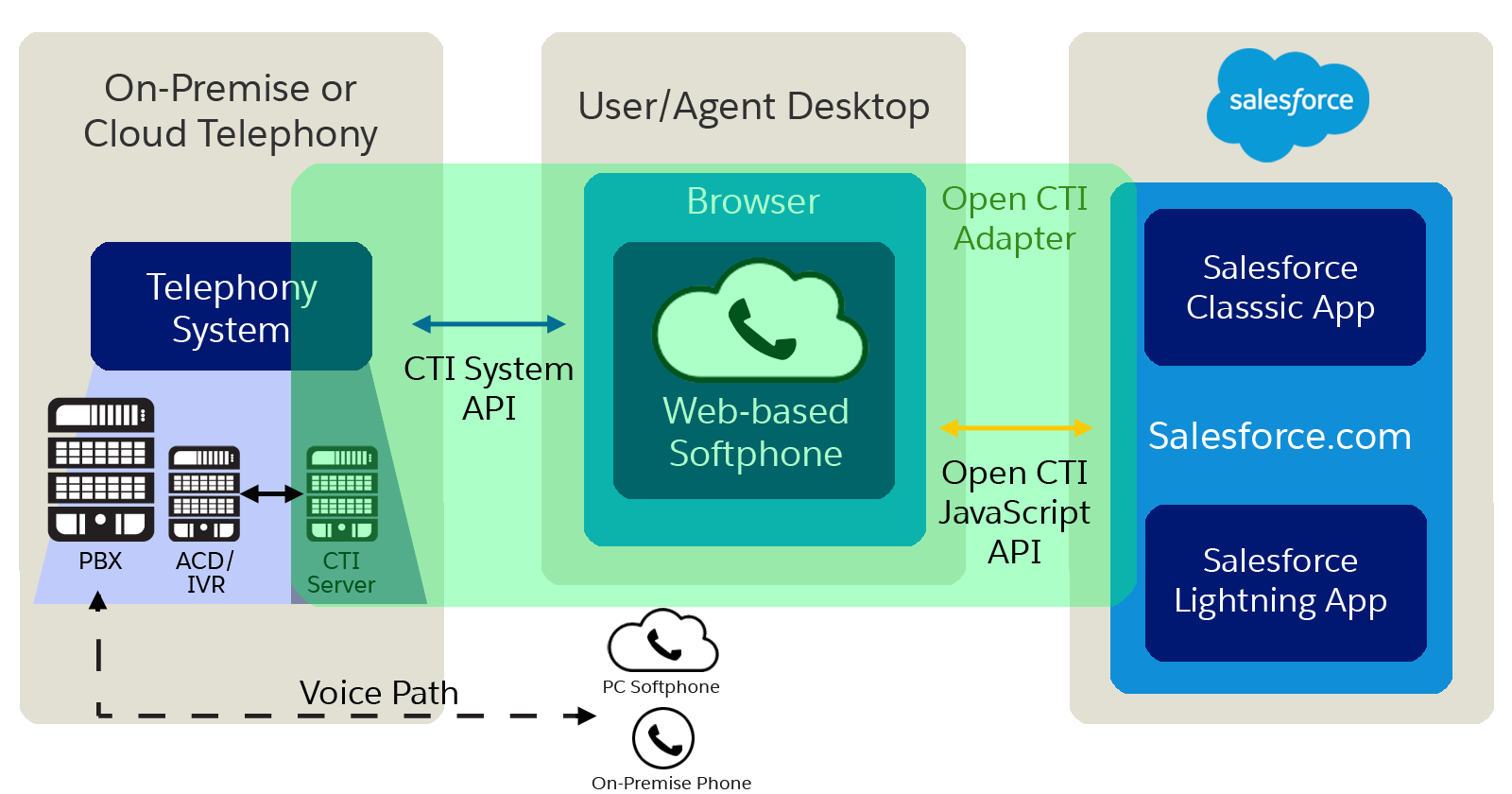
The way you implement Open CTI depends on your org’s user interface. There are separate Open CTI APIs for Salesforce Classic and Lightning Experience. You can’t swap the two Open CTI APIs in custom JavaScript code because they behave and function differently. Make sure that you think about where you want to implement your CTI system before you begin developing.
Before the introduction of Open CTI, Salesforce users could only use the features of a CTI system after they installed a CTI adapter program on their machines. These types of programs often included desktop software that required maintenance and didn’t offer the benefits of cloud architecture.
Typically, CTI vendors or partners create Open CTI implementations. After you have an Open CTI implementation, it’s integrated with Salesforce using the Salesforce Call Center. Keep in mind that the out-of-the-box Service app is a Salesforce Classic app and only supports Open CTI for Salesforce Classic. To make calls in Lightning Experience, use Open CTI for Lightning Experience in a Lightning Experience app, like our out-of-the-box Service Console app.
CTI vendors and partners use Open CTI in JavaScript to embed API calls and processes. With Open CTI vendors and partners can:
- Build CTI systems that integrate with Salesforce without the use of CTI adapters.
- Create customizable softphones (call-control tools) that function as fully integrated parts of Salesforce and the Salesforce console.
- Provide users with CTI systems that are browser and platform agnostic, for example, CTI for Microsoft® Internet Explorer®, Mozilla® Firefox®, Apple® Safari®, or Google Chrome™ on Mac, Linux, or Windows machines.

