
You are here:
Guidelines and Limits for Einstein Conversation Mining
Review the guidelines and limits for Einstein Conversation Mining.
Required Editions
| View supported editions. |
General Guidelines
- Einstein Conversation Mining reports support English, French, German, Italian, and Spanish only.
- If generative AI is enabled in your org, other languages are supported such as French, German, Italian, and Spanish.
- Einstein Conversation Mining reports only consider data from the last two years.
- Einstein Conversation Mining reports leverage generative AI when enabled in your org.
- When you create two Einstein Conversation Mining reports with the same filters, you see different results for topics and contact reasons in each report. Our clustering algorithm can result in different cluster results.
- To ensure the quality of your reports, verify that the text you analyze is free text such as not auto-generated and filter out irrelevant data in segmentation. For Web-to-Case, select text fields that are free text.
Report Guidelines
- For Email-to-Case reports, only the first email in a thread is used in Einstein Conversation Mining reports.
- Email Message records must be associated with a Case (the ParentId field is Case) to be included in Einstein Conversation Mining reports.
- For Web-to-Case reports, we don’t support Web-to-Case reports in the Service Intelligence dashboard.
- For Enhanced Conversations reports, we don’t support Enhanced Conversations reports in a sandbox.
- Voice (Contact Centers) channel types support English only. If you select another language, you won’t see Voice channels listed in the Enhanced Conversations list.
- To view the data used to build the contact reason, click the summary name in a topic or View Details in Top Recommendations.
- To get a CSV file of all contact reasons associated with a topic, click Download in Topics.
- In the contact reason detail page, click Download to get a CSV file of up to 500 excerpts.
- For Email-to-Case and Chat conversations, you can learn more about each interaction and click View Transcript to view the transcript snippet. For Enhanced Conversations and Web-to-Case conversations, click View Transcript to go to the transcript record. For Enhanced Conversation, go to a messaging session or voice call record, and for Web-to-Case conversations, go to a Case record.
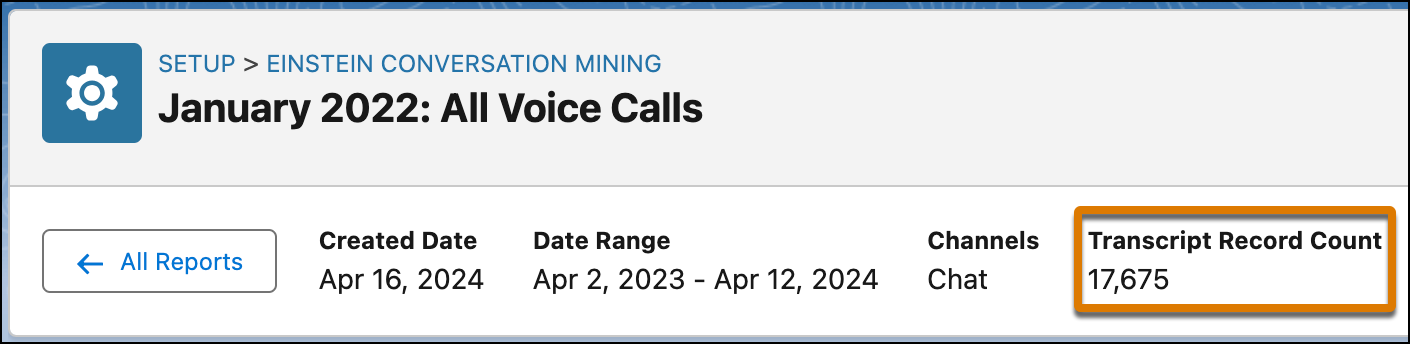
- You can view the Transcript Record Count, which represents the transcripts
(conversations) that were used to generate the report and doesn’t relate to the number of
Conversation Reason Excerpts (utterances) that were generated. Conversation Reason
Excerpts follow different rules and have more limits to what they capture.
Conversation Reason Excerpts capture a limit to a maximum of 500 utterances per conversation reason.
When excerpt data is ingested into Data 360 using Ingestion API, Conversation Reason Excerpts capture a limit of 3,000 excerpts per conversation reason.
Only 100 max conversation reasons per bot session and 100 per service rep session are stored.
Did this article solve your issue?
Let us know so we can improve!
