
You are here:
Set Your IT Case Page Layout for Email-to-Case Enablement
Set the Email quick action in your IT Case Page layout to generate cases from the Service Console and Employee Service community.
Before you begin, execute the Service Cloud Email-to-Case Guided Setup Flow.
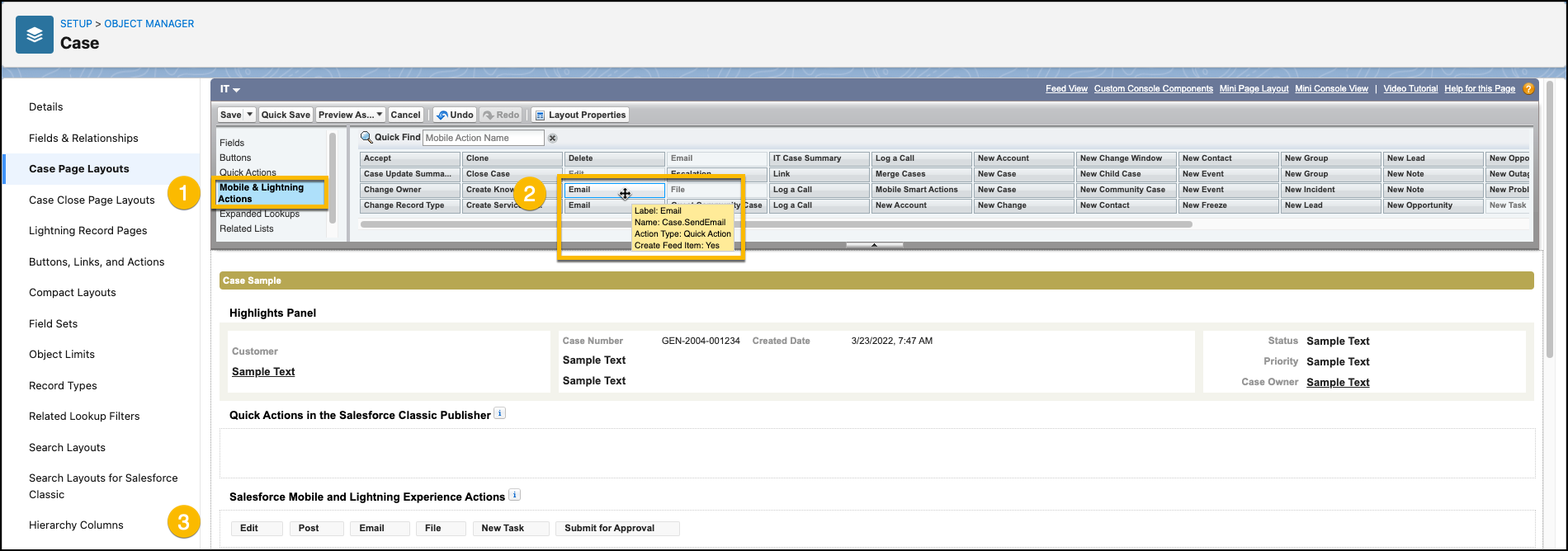
- From Setup, in the Object Manger, select Case.
- From the Case object page, select Case Page Layouts > IT.
-
From the IT Case Page Layout page, under Mobile & Lightning Actions, select the Email
quick action named
Case.SendEmail, and then place it in the Salesforce Mobile and Lightning Experience Actions field.To display the name, hover over the Email label in the quick actions list.
- Save your layout.
Did this article solve your issue?
Let us know so we can improve!
