
You are here:
Learn About Model Quality and Improve Recommendations
Einstein produces a scorecard that tells you about your data and the effectiveness of your model. At a glance, learn if there are opportunities to refine your data and continually fine-tune your recommendations.
Required Editions
| View supported editions. |
Understand Model Quality
When you build the model or Einstein retrains it, the scorecard updates. The scorecard shows metrics about the model and the quality of your case and article data. When your model is effective, your service reps see more accurate article recommendations, which can help them close cases.
From Setup, navigate to the Einstein Article Recommendations page, and open the Model Scorecard tab.
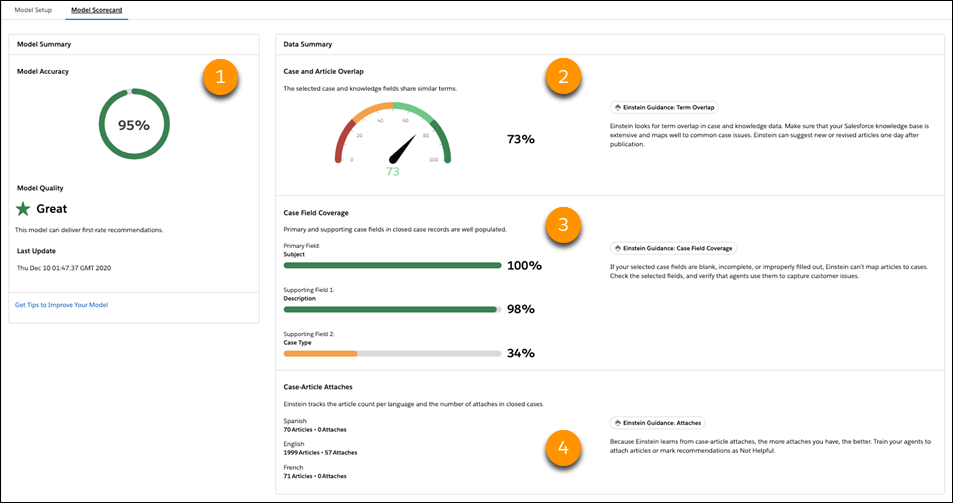
Here’s what the scorecard shows.
| Model Accuracy | This percentage represents an overall confidence score about Einstein’s ability to make accurate predictions. If you change model settings or refine your closed case data, this value can help you evaluate the impact. |
| Model Quality | The scorecard summarizes model quality. You can activate the model as long as its quality is Great, Good, or OK. If model quality is Too Low, Einstein can’t make useful recommendations, so activation is disabled. Review the data summary and learn how you can improve your data. |
| Case Field Coverage | When there are more than 500 case-article attaches for Einstein to learn from, the scorecard reports field coverage. For closed case records, the scorecard shows coverage results for the primary and two supporting case fields. When these fields are well populated, Einstein can make more accurate article recommendations. Verify that your selected fields are in the right order and that your service reps complete these fields consistently. |
Einstein only recommends knowledge articles that meet strict accuracy criteria. To continually fine-tune Einstein Article Recommendations, follow these best practices when you customize your model and maintain your cases and articles.
Tableau for CRM customers can use the new Einstein Article Recommendations Value Dashboard managed package to quickly build and dig into reports and visualizations for recommendation’s business value, KPIs, and exclusive analytics. The dashboard uses your case data and article performance metrics to show your most recommended articles, how service reps interact with recommendations, and Article Recommendations estimated ROI.
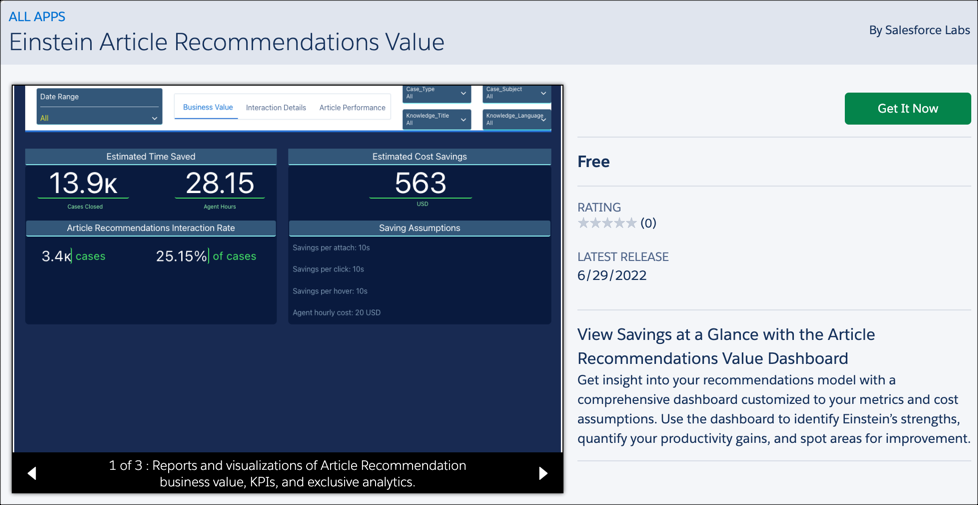
To access the Einstein Article Recommendations Value dashboard, download the Einstein Article Recommendations Value dashboard app template from AppExchange.
Customize Your Model
When you customize the model, you point Einstein to the right fields to learn from. In some orgs with Knowledge, we set up article recommendations for you with a pre-built model that’s based on generic data and default field and language settings. If your business uses other fields, your service reps can see more accurate recommendations when you accept the terms in Setup, select the right fields, and update the model so that Einstein learns from your org’s closed-case data.
Here’s some other tips to boost prediction quality.
- Include data-rich, high-use fields in your model. Look for text fields that typically
contain multiple words that tell you what the case or article is about. Unpopulated or
uninformative fields make it hard for Einstein to make accurate predictions. If possible,
choose fields that are rarely left blank and are typically updated at least once during the
case lifecycle, such as Description. A case’s article recommendations are refreshed whenever a
field included in your model is updated on the case.
 Note Only unencrypted fields of the string or text area type—including rich text area and long text area fields—can be added to your model. You might find that an unsupported field, such as a picklist, provides valuable information that could help Einstein find relevant articles. To include that information in your model, write a process that copies the field value into a custom text field on the case or knowledge object. Then, add the custom field to your model.
 - Rank fields based on importance. When you select fields to include in your model, drag them into priority order. Einstein wants to know what matters most to you. By ranking your fields, you’re essentially telling Einstein what to look for first.
- Review the model scorecard. The scorecard shows metrics that can help you identify where there are opportunities to improve your data.
Maintain Your Data
- Strive for field consistency on cases and knowledge articles. Leaving fields blank, inconsistently filling them out, or gathering overly generic data can hurt your recommendation accuracy.
- Keep attaching articles to cases. We recommend that service reps attach an article to a case if they referred to it while working on the case. Conversely, if past cases have unrelated articles attached to them, this can give Einstein a false impression of the article’s purpose and affect article relevance scores.
- Keep expanding your knowledge base. The more articles in circulation, the more Einstein has to attach and learn from. Einstein reviews new articles within one day of publication.
- Encourage service reps to dismiss recommendations that aren’t helpful. Einstein considers dismissals when formulating recommendations.
