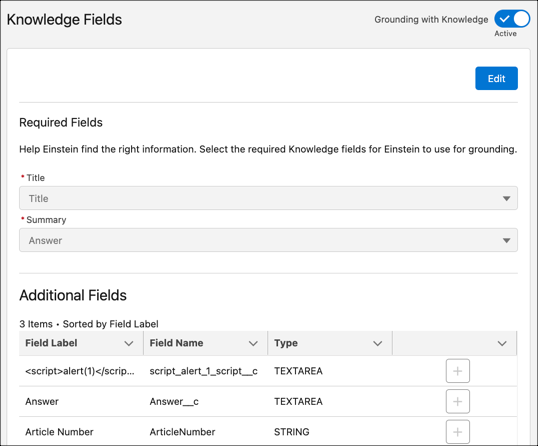
Select the title, summary, and additional Knowledge fields for Einstein to ground on.
Einstein uses information from your selected knowledge fields to draft personalized
responses.
In Service AI Grounding Setup, under the Knowledge tab, select
Edit.
Under Required Fields, select Title Field and Summary
Field. The title and summary fields are required for grounding on the
Knowledge Article object. You can choose the default Title field or a custom title
field.
For example, you can replace the default Title field with a custom field labeled
Header. Or, if you don’t want to limit yourself to a certain record type, choose widely
used fields in the required section, and then add specific record-type fields in the
additional fields selection.
Under Additional Fields, select any other fields you want Einstein to consider for
grounding. Additional fields can’t repeat as required fields.
Click Save.
Activate grounding for your Knowledge records.
Einstein begins indexing your published Knowledge Articles. Indexing can take several hours
depending on the size of your Knowledge base. Indexing for new articles occurs once every 24
hours.
Incorporate knowledge from third-party systems such as SharePoint, Confluence, Google
Drive, and websites within Salesforce, with unified knowledge. See Unify Knowledge from Various Sources (Beta).
Important
Field level security limits the grounded responses that users can see. Users only see
grounded responses for fields that they can access.
Users only see grounded responses for Knowledge Article Versions that they can
access.
Encrypted fields aren’t supported for grounding. Einstein can’t ground on or make
predictions for encrypted fields.
Service AI Grounding only supports String and Text Area type fields.
We use three kinds of cookies on our websites: required, functional, and advertising. You can choose whether functional and advertising cookies apply. Click on the different cookie categories to find out more about each category and to change the default settings.
Privacy Statement
Required Cookies
Always Active
Required cookies are necessary for basic website functionality. Some examples include: session cookies needed to transmit the website, authentication cookies, and security cookies.
Functional Cookies
Functional cookies enhance functions, performance, and services on the website. Some examples include: cookies used to analyze site traffic, cookies used for market research, and cookies used to display advertising that is not directed to a particular individual.
Advertising Cookies
Advertising cookies track activity across websites in order to understand a viewer’s interests, and direct them specific marketing. Some examples include: cookies used for remarketing, or interest-based advertising.